
Every tool you already pay for now calls itself AI. Your inbox says automation will run your whole company, and your gut says most of it is noise.
Both are half right.
AI automation for business is real, and some of it pays for itself within a quarter. Plenty of it stalls in a pilot and quietly dies. The difference has almost nothing to do with which tool you buy.
So this post skips the hype in both directions. You'll see what AI automation covers now, the four areas where the money actually shows up, why so many projects get canceled, and how to pick a first workflow that earns its keep. Let's get started.
What AI Automation Means Now
AI automation is software that completes business tasks which used to need human judgment, such as answering a caller's question, drafting a follow-up email, or pulling totals from a messy invoice. Older automation followed fixed if-then rules. AI automation reads context and handles the exceptions those rules always broke on.
That distinction sounds academic until you run a business on it.
A rules-based tool sends the same reminder to every unpaid invoice. An AI-driven one reads the reply that says "we mailed a check Tuesday" and stops chasing. One follows a script, while the other handles the messy middle where most of your real work lives.
In practice, the category now covers three layers.
- Assistants: Tools that draft, summarize, and answer inside work you still control, like writing a first-pass proposal.
- Workflow automation: Connected steps that move data and trigger actions across your calendar, CRM, and inbox without you touching them.
- AI agents: Software that pursues a goal across multiple steps on its own, such as answering a call, booking the appointment, and logging the notes.
The third layer is where the market is sprinting. Gartner projects that 40% of enterprise applications will carry task-specific AI agents by the end of 2026, up from under 5% in 2025. And McKinsey's State of AI survey finds 88% of organizations now use AI regularly in at least one business function.
Adoption stopped being the question a while ago.
The open question is where the money actually shows up, and the answer has a clear shape.
Where Does AI Automation Actually Pay Off?
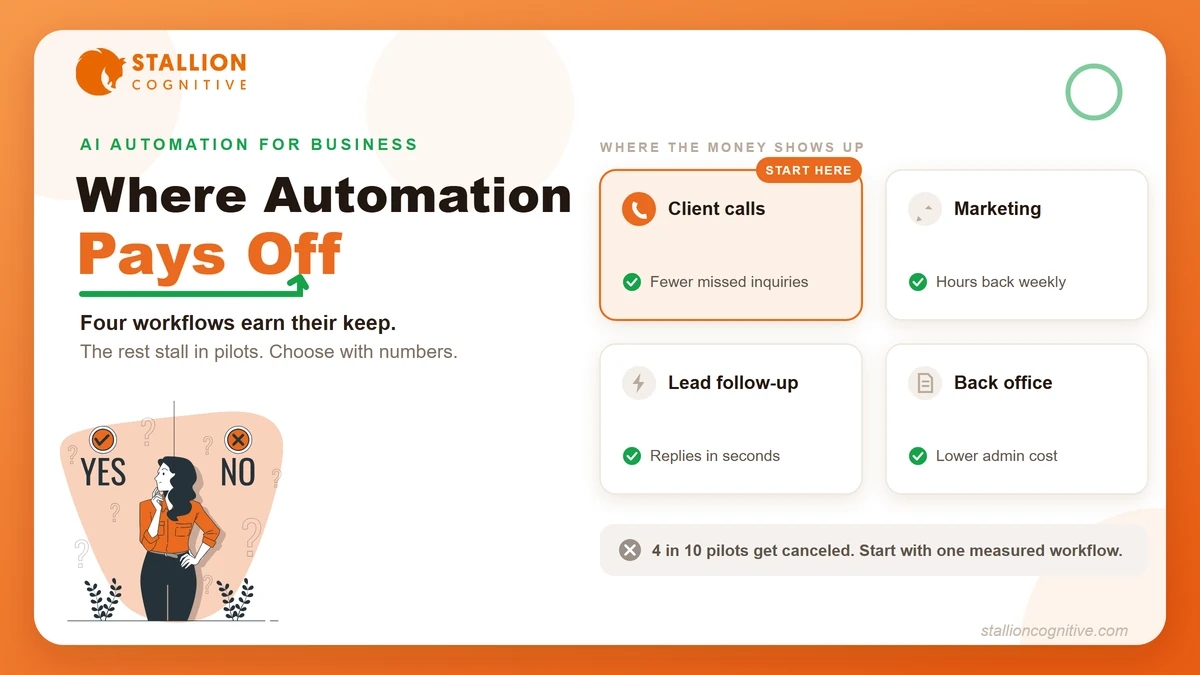
The returns cluster in four areas, and they share one trait. Each replaces high-volume, repetitive work that was already costing you money in a way you could count, whether in missed inquiries, unbillable admin hours, or leads that went cold before anyone replied.
Here's the map at a glance.
| Where it runs | What the AI handles | The payoff signal |
|---|---|---|
| Client communication | Calls, chat, intake questions, appointment booking | Fewer missed inquiries, faster first response |
| Marketing and content | Drafts, repurposing, research, reporting | Hours back every single week |
| Sales and lead follow-up | Speed-to-lead replies, qualification, CRM hygiene | More conversations booked per lead |
| Back office | Invoicing, document intake, scheduling, data entry | Lower admin cost per client |
Now let's take them one at a time.
Client communication
Missed communication is the most expensive problem on this list because it costs you revenue rather than time. A prospect who calls twice and gets voicemail twice usually stops calling.
An AI receptionist answers every call, handles the routine questions, books the appointment, and hands anything sensitive to a human with full context. Website chat tools do the same job for visitors who would never pick up the phone.
The economics hold up in the data, too. HubSpot found companies using AI in customer service cut operational costs around 20% while satisfaction improved.
What makes this the best first automation for most service firms? The before-and-after is countable. You know how many calls went unanswered last month.
Marketing and content
Marketing is where most businesses meet AI first, usually through drafting. The same HubSpot research puts the time saved on repetitive tasks near 2.5 hours per worker per day, and content work absorbs the biggest share of that.
The current crop of AI marketing tools goes well past drafting, though. They repurpose one blog into a month of social posts, monitor competitors, and assemble reports that used to eat a Friday afternoon.
There's a second marketing payoff most owners haven't priced yet, and that's AI search itself. The work of getting your firm cited by ChatGPT and surfaced in AI answers is its own discipline now, and generative engine optimization is how firms compete for those citations.
Automate the production and keep a human on the judgment calls.
Sales and lead follow-up
Speed decides more deals than skill does at the top of the funnel. A lead that fills out your form at 9 pm on Saturday either hears back within minutes or starts comparing your competitors by Sunday brunch.
AI follow-up closes that gap in three specific ways.
- Instant first touch: A reply goes out in seconds with a real answer, never a "we received your message" placeholder.
- Qualification: The system asks budget and timeline questions, so your Monday morning starts with sorted leads rather than a raw list.
- CRM hygiene: Every interaction gets logged automatically, which quietly fixes the follow-up gaps that come from nobody updating records.
Retail and product companies push this even further. An AI e-commerce business can run product recommendations, cart recovery, and support on the same rails.
Back office and operations
Nobody brags about this category, and it may be the steadiest earner of the four. Invoice processing, document intake, meeting scheduling, and report assembly are pure cost centers. Every hour they consume is an hour nobody billed.
AI handles them well precisely because the stakes per task are small and the volume is huge. A misfiled document gets caught on review, but a missed sales call never comes back.
Pick this category first when the loudest complaint is admin overload, and pick communication first when the complaint is a quiet phone.
Why Over 40% of AI Automation Projects Get Canceled
Now for the part the vendor blogs skip. Gartner predicts that over 40% of agentic AI projects will be scrapped by the end of 2027, citing rising costs, unclear business value, and risk controls that weren't there.
The scaling numbers tell the same story from the other side. McKinsey found that while 62% of organizations are at least experimenting with AI agents, no more than 10% are scaling them in any given business function. HubSpot's data agrees, with 74% of companies reporting they struggle to turn AI into scaled value.
Experiments are everywhere, while the payoff stays with the firms that run them with discipline.
We've watched the failures follow the same four patterns across client work.
- Automating a broken process: If your intake was chaos with humans, AI makes it faster chaos. Fix the workflow first, then automate the fixed version.
- No owner: Tools get adopted in a burst of enthusiasm, then drift because nobody's job is to watch the outputs weekly.
- The demo-to-production gap: The vendor demo ran on clean sample data. Your real invoices, voicemails, and lead forms are messier, and accuracy drops with them.
- Cost creep: Per-seat pricing, usage fees, and integration work stack up, and nobody re-runs the math after month three.
Notice what's missing from that list.
The model itself almost never fails first, because nearly every failure starts in the organization around it. That's exactly why the first-project decision deserves more care than the tool decision.
How Do You Pick Your First Automation?
Choose the workflow, then the tool. A good first automation has volume you can see, a cost you can price, and an outcome you can measure within a month. Here's the sequence we recommend to firms starting from zero.
- List your three most repetitive workflows: Think phone intake, lead follow-up, invoice chasing, or report assembly. Volume beats novelty.
- Price the manual version: Count the hours spent and the inquiries missed last month, and attach real dollar figures to both.
- Pick the one with a countable outcome: "Fewer missed calls" beats "better marketing" because you'll know in 30 days whether it worked.
- Pilot with a fallback: Run the AI on after-hours calls or overflow only, keep the human path open, and read the transcripts weekly.
- Scale only after the numbers hold: When the pilot beats the manual baseline for a full month, widen its scope. If it never does, kill it without guilt.
That last step is the discipline most firms skip.
A pilot that limps along at break-even for six months costs more than the one you canceled in week five. Gartner's cancellation wave will be full of projects nobody measured and nobody was willing to end.
Would your team pass step two today? Most can't, and that's the honest starting point.
What This Looks Like for a Professional Services Firm
Financial advisors, accountants, and law firms sit in a sweet spot for AI automation because the mix of high inquiry value, heavy admin load, and a calendar-driven model makes the math work fast. The same three workflows come up in nearly every firm we look at.
- The quiet phone problem: Calls arrive during client meetings and after hours, exactly when nobody can answer. Intake automation catches the inquiry a competitor would otherwise get.
- The follow-up lag: A tax-season inquiry answered Thursday was worth thousands on Monday. Automated first-touch keeps the lead warm until a human takes over.
- The admin tax: Engagement letters, document collection, and appointment shuffling consume hours that never appear on an invoice.
One caution belongs here. Client confidentiality rules apply to AI tools the same way they apply to staff, so check where a vendor stores data and what it trains on before anything touches client records.
The firms winning with AI automation picked one expensive bottleneck, automated it well, and let the results fund the next move.
The website ties all of it together, since every automated call, chat, and follow-up eventually points somewhere. Some firms even build a website with AI as their first automation project, then wire communication tools into it.
Start Smaller Than the Hype Suggests
The gap between the 88% who use AI and the few who profit from it comes down to scope. The winners picked one measurable workflow, ran it against real numbers, and expanded from evidence. The canceled projects tried to transform everything at once.
You need one bottleneck priced, one pilot measured, and one decision made from real numbers. A transformation can come later, funded by evidence.
Which workflow in your business fails the "would this survive step two" test? If you want help finding it, and building the automation around it, start a conversation with our team and we'll map it with you.
Frequently Asked Questions
How much does AI automation cost for a small business?
Entry tools for a single workflow typically run from under a hundred to a few hundred dollars per month, while custom multi-system builds reach four or five figures. Price it against the manual cost of the same work, then confirm current pricing with each vendor.
Is client data safe inside AI automation tools?
That depends entirely on the vendor. Look for clear answers on where data is stored, whether your inputs train their models, and available business agreements. Firms under confidentiality obligations should treat this review as mandatory before any pilot.
Do you need technical staff to run these tools?
Most single-workflow tools now set up through guided dashboards rather than code, and an agency or consultant can handle the connections between systems. Deeper custom builds still call for developer time, which is worth budgeting for upfront.
How long before an automation shows results?
A well-chosen pilot shows a readable signal in about 30 days, since call, chat, and follow-up volumes accumulate fast. Give it one full business cycle before judging, and compare against the manual baseline you priced beforehand.
Should a business automate before hiring another person?
Run the comparison for the specific role. Automation wins on around-the-clock coverage and repetitive volume, while a hire wins on judgment, relationships, and varied work. Many firms automate the repetitive layer first, then hire for the work that grew because of it.