
Google will now tell you which searches lead people to your firm's videos, and it does it inside a tool you already open.
Google Search Console platform properties went live worldwide on 29 July 2026, and they link a social or video account to Search Console so it can report how that content does on Google.
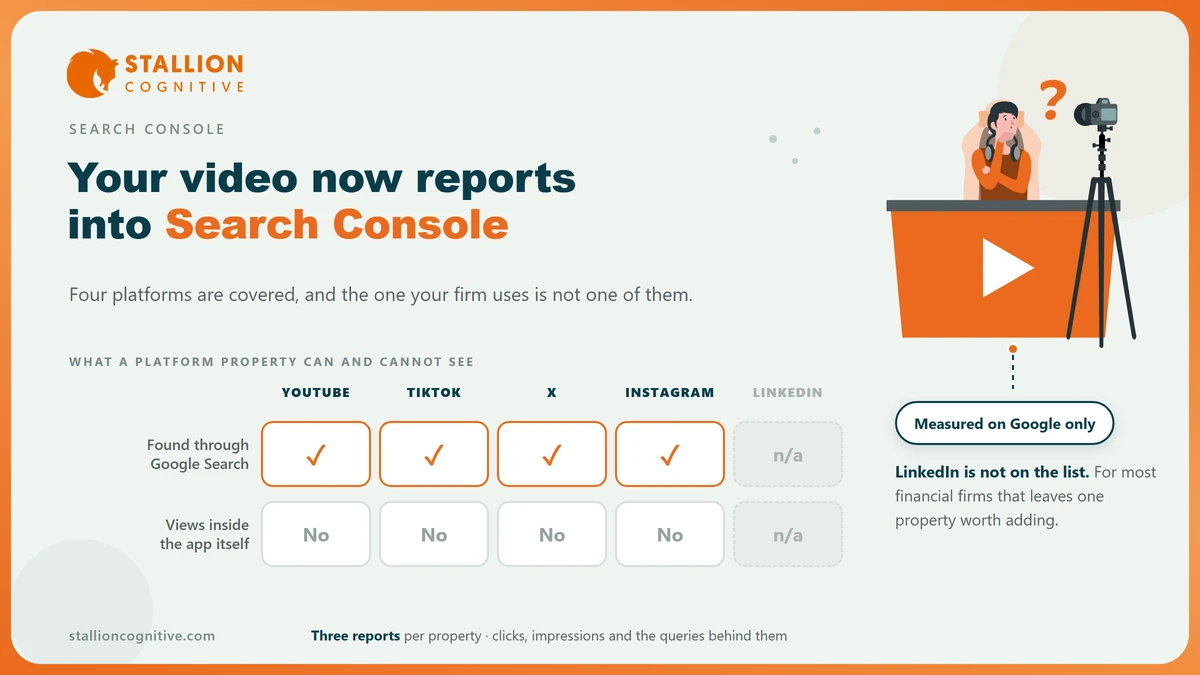
Four platforms are covered, and the one where most financial firms publish is missing from the list.
Whether any of this is worth an hour depends on where your partners post.
What a platform property actually is
A platform property is a second kind of property in Search Console that points at an account somewhere else instead of at a site you own. Google's help page calls it your presence on a supported platform, and it sits in the same list as your website.
The change is smaller than the headlines and more useful than it sounds.
- What does it measure? Only what happened on Google, meaning Search, Discover and News, and none of it is about the platform.
- It sits beside your site property: The property picker holds both, so the comparison is one click.
- It reports queries: The search terms that led people to a post are listed, which no social platform has ever shown you.
- Does anyone need to write code? No. You link the account through Google's own flow, so there is no tag to add and nothing for a developer to do.
That third point is the one that changes a decision. A firm can finally see that a two minute video on inherited pension pots is being found by people typing a question, and read the exact question.
The rest of the list is convenience.
Which platforms are in, and the one that is not
Four platforms are supported at launch, and Google's platform properties documentation names them.
| Platform | Supported | What a professional firm usually has there |
|---|---|---|
| YouTube | Yes | Explainer videos, webinar recordings, client question answers |
| Yes | Team photos, event posts, occasional short video | |
| TikTok | Yes | Rarely anything, and rarely appropriate |
| X | Yes | A partner account posting commentary during budget season |
| No | Almost everything a financial firm publishes socially | |
| No | The page a receptionist set up in 2019 |
The gap where LinkedIn should be is the whole story for this audience. Advisers, accountants and law firms put nearly all their social effort there, and Pew's tracking of social media use shows how differently the four supported platforms are used by US adults.
Read the list as a video feature with three extras attached. YouTube is the one on it a professional firm really uses, and the other three are there for creators.
A firm with no YouTube channel and no live X account gains nothing here, and that is a fair place to land.
What the three reports show
Each property brings the same three reports, and all of them open on the last 28 days.
- Performance carries clicks, impressions and the queries behind them, in the layout the website report already uses.
- Insights sums up trends and names your best posts over the period.
- Achievements marks milestones your content has passed, and it is the least useful of the three for a firm.
The Performance report is the one to open. Clicks and impressions repeat what the platform told you, and the query list is new.
Widen the date range before you read anything into it, because 28 days is short for a firm whose video on a tax question builds slowly and peaks around a deadline.
The queries are the product. Everything else in the report is a count you already had.
Reading that query list beside the one from your website is where the value sits, because the two often disagree.
A firm whose site ranks for service phrases will often find its video ranking for the plain question underneath them, and that gap is a content plan.
What a platform property cannot tell you
It cannot tell you how the post did on the platform. Google states the limit plainly, saying platform properties only show how your content does on Google Search and will not show how many times a video turned up on the platform itself.
Most of your video's audience never touched Google, and none of them are in this report.
So the report is a slice, and it has to be read as one.
- It leaves out views that came from inside the app, which for most channels is the bulk of them.
- It leaves out anything before the day you linked the account, so there is no back data coming.
- It says nothing about what a viewer did next, because the visit landed on a site you do not run.
Your own analytics cannot follow that person to your site either, which is the same wall covered in Search Console against Analytics. Read platform data as proof of discovery and keep enquiry counting where it already lives.
Is this worth a financial firm's time?
For most firms, once, for the video channel, and then left alone. Setup is a few minutes and the reports run themselves, so the cost side of the decision is close to zero.
What you get back depends entirely on what you publish.
| Your situation | Worth doing | What you will learn |
|---|---|---|
| An active YouTube channel of client questions | Yes, first thing | Which questions people search for, in their own words |
| A dormant channel with four videos from 2024 | Not yet | Nothing, until there is something to measure |
| A partner posting commentary on X | Yes, if the account is the firm's | Whether the commentary is found by search or only by followers |
| LinkedIn only | No | Nothing is available, and nothing will be |
Traffic is only half of why this is worth doing. Video is where a regulated firm is most likely to say something loose, and the FTC's guidance on endorsements and reviews covers a testimonial in a video exactly as it covers one on a page.
Knowing which videos search is surfacing tells you which ones a compliance check should read first. The same argument runs behind a client testimonial page, applied to a surface most firms check far less often.
How do you add one?
Through the same property picker you already use, and the whole thing runs on a sign-in instead of markup.
- Open Search Console and select Add property from the picker, or go straight to the verification page.
- Choose one of the four platforms from the list.
- Follow Google's steps to link the account, which Google sets out alongside adding a property.
- Give it a few days, because the reports only hold data gathered after the link is made.
- Open the Performance report, widen the date range past the 28 day default, and read the query list.
- Put those queries somewhere your content plan can see them.
Who at the firm has to do step three? Whoever holds the platform login, which is often the marketing coordinator and not the person who owns Search Console. Settle that before you start.
Add the video property and stop there. Linking an Instagram account that holds three office photographs gives you a report about three office photographs.
Where that leaves your reporting
Search Console has quietly become a reporting tool for content that is not on your website, which is a bigger change than the launch made it look. The catch for this trade is that the platform professional firms lean on is not on the list.
- Link YouTube if the channel is alive: The query list is new, and nothing else shows it.
- Skip the rest for now: An empty property is a report about nothing.
- Read the queries beside your site's: Where the two disagree is where the content ideas are.
The same instinct covers how your firm turns up in answers you did not publish, which is the ground of brand mentions and of the AI performance report that arrived a month later, and none of it means much until you can read average position without being misled by it. Our strategy session exists to put those three reports in front of the partners who set the budget.
Frequently Asked Questions
Does connecting an account give Google anything it did not have?
Google already indexes public posts. The authorisation lets it attach the performance data to your account, which is a reporting link and changes nothing about what is crawled.
Will LinkedIn be added later?
Google has named four platforms and promised nothing beyond them. Plan on the list as it stands, and treat any addition as a bonus you were never waiting for.
Can our agency see the data?
Access follows the normal Search Console roles, so a user with the right one sees the new property in the same list. The platform sign-in itself has to come from whoever holds the account.
How far back does the data go?
Collection starts on the day you link the account, and there is no back data. Link it before the campaign you want to measure, never after.
Our channel has four old videos. Should we bother?
Leave it until there is something worth reading. A property reporting on dormant content produces a chart of zeroes and one more login to maintain.