
You uploaded eight photos three weeks ago. Two appeared, one vanished after a fortnight, and the rest still say pending. Nothing you have changed since has moved them, and every article you found blamed the file size.
File size is almost never the problem.
Google publishes a status for each item you upload. It publishes what each status means. It also publishes a content policy that most firm photography fails on its very first line.
Read those three things together and the pattern in your own profile usually clears up inside ten minutes.
What follows is what each status means, the documented reason photos stick on pending, and why the images your firm already owns are the wrong ones to send.
Where Do Your Photos Actually Stand Right Now?
Before you diagnose anything, read the status Google has already given you. Open the profile, go to the photos section, and check each item on its own. The Business Profile help pages define what you are looking at.
| Status | What Google says it means | What it tells you to do |
|---|---|---|
| Published | The media is live on Search and Maps | Nothing it worked |
| Pending | The upload or processing stage or the profile is not verified | Check verification first then wait |
| Not approved | The media was flagged and has violated policies | Read the content policy and reshoot |
| Disappeared later | Removed after publishing often on quality | Replace it and see section five |
Most owners never open that screen, and work from the public profile instead, which shows only what survived.
A rejected photo and a photo you never sent look the same from the outside.
So start in the manager. The map listing cannot tell you which of the two you are looking at.
Google's stated processing window runs up to two days for photos and videos to show on a profile. A photo still sitting after that is not queueing, and treating it as a queue is what turns a two-day question into a three-week one.
Why Does a Photo Sit on Pending for Days?
Google's own definition of the status carries the answer, and it names a cause that has nothing to do with your image:
"Pending: The media is in either the upload or processing stage, or your profile is currently not verified."
An unverified profile holds media for good. No amount of resizing or reuploading will clear it, because the profile is the blocker and the photo is fine.
The image was never the problem.
That catches firms all the time. A profile can look complete, show up in search, hold reviews, and still not be verified, especially after an address change or an ownership transfer restarted the process. If yours is in that state, the way out is to verify your Business Profile first and check the photos afterwards.
A second cause is worth naming, because the whole industry states it as fact. Plenty of articles claim new profiles are sandboxed for two weeks and cannot publish images in that window.
Google documents no such rule. There is no sandbox in the help pages, none in the content policy, and none in the guidelines for representing your business. The claim shows up only in agency and vendor blogs, each citing the next.
A new profile does often hold photos. The written reason for that is the verification state, which a new profile is most likely to be in.
Treat the missing Google page as the finding. When a rule matters enough to change what you do, and the company that would enforce it has never written it down, the rule is someone's guess.
What Does Google Ask a Photo to Be?
The rules live in the photo and video content policy, which is short and much stricter than owners expect. Four lines do most of the work.
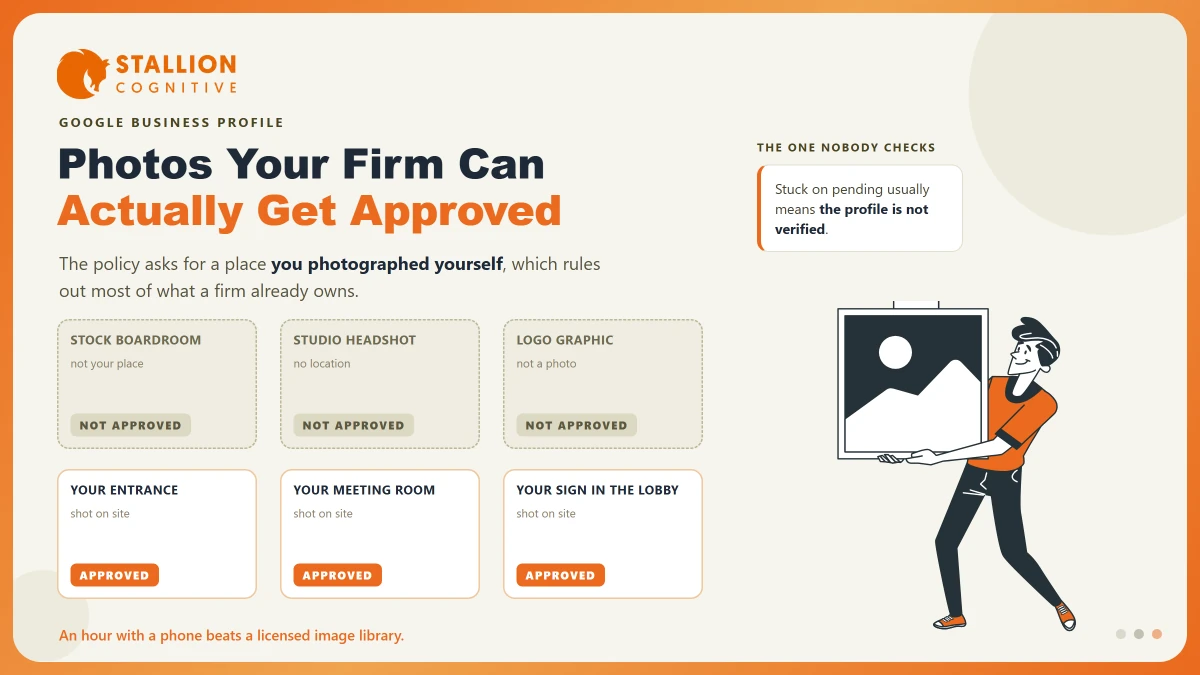
- Capture it yourself: Google asks you to "upload media of a place that you captured using a camera" and to avoid "screenshots, stock photos, GIFs, collages."
- Make the place the subject: The policy says "the location should be the primary subject of the content."
- Keep it sharp: Google asks for high resolution and says to "avoid blurry or out-of-focus imagery."
- Keep overlays relevant: Promotional text on an image has to relate to the place it was posted for.
The technical rules are the easy part, and the part everyone checks first. Google asks for JPG or PNG, a file between 10 KB and 5 MB, and a size of 720 pixels square.
Any current phone clears all three without being asked.
Uploads die on the policy lines instead. Those lines are written around a camera and a place. That suits a restaurant or a shopfront, and it sits awkwardly with a firm whose product is advice given in a meeting room.
Why a Professional Firm's Photo Library Fails That Test
Ask an advisory firm for photos and you get the same set every time. It is often good, expensive work that a Business Profile can barely use.
| What the firm already owns | Why it fails the policy | What passes instead |
|---|---|---|
| Headshots on a plain studio backdrop | No location visible so the place is not the subject | The same people photographed at the office |
| Licensed stock of a boardroom | Not captured by you at your place | Your actual meeting room with the lights on |
| Logo on a coloured background | A graphic with no place in it | The signage as it appears in the lobby |
| Team photo shot offsite at an away day | The location is real and it is the wrong one | The team in the space clients visit |
| Infographic or a service list card | A designed asset and not a photograph | A short video walking the entrance route |
| Screenshot of an award certificate | Screenshots are named in the policy | The certificate on the wall it hangs on |
The pattern holds across every firm we audit. Marketing photos are built to look good on a website, where a plain background helps. The profile policy wants proof that a place exists and that someone stood in it, which is close to the opposite brief.
That gap matters more than it looks, because photos feed the completeness signals behind whether a listing surfaces at all. If your listing is not showing on Google Maps, a thin or rejected photo set is rarely the whole story and is often part of it.
Regulated firms hit a real snag here, and it deserves saying plainly. Client privacy rules out photographing anyone in a meeting. A shared or serviced office limits what you can shoot in a lobby you do not control.
The workable set is small, and it exists.
The entrance and street view, your own sign, reception outside working hours, an empty meeting room, and the team standing in the space they work in.
The Removals That Cannot Be Appealed
One line in the policy deserves far more attention than it gets, because it closes off an option people spend weeks hunting for:
"Low quality media may be removed; quality removals can't be appealed."
A photo taken down on quality grounds has no route back.
No form, no appeal, no support conversation reverses it.
That sets it apart from most Business Profile problems, where an appeal often exists. When a profile gets suspended there is an appeals tool. For a quality removal there is nothing like it.
So stop spending effort on recovery and put it into the next upload. Shoot in daylight, hold the camera still, keep the subject sharp, and upload the original file instead of one squeezed through a design tool.
Heavy edits work against you. The policy asks that media "still provides a clear, accurate depiction of the place."
The same habit pays off everywhere else. Content rules for Business Profile posts are separate, and reading the policy before you publish is the same discipline.
Who Actually Picks Your Cover Photo?
Owners assume the cover photo is a setting. Google treats it as a preference and keeps the decision:
"If the cover photo you select is low-quality or if other sources suggest that it's not the best photo to represent your business, a user-submitted photo may be selected instead."
So the picture a prospect meets at the top of your listing may well be one a client took on their phone in the corridor, and the only real influence you have is making your own version obviously better than theirs. Customers and passers-by can add photos to any profile, and those uploads sit in the same pool as yours. You cannot remove one for being unflattering. You can report an image that breaks the content policy, and past that the answer is the volume and quality of your own material.
Google's Business Profile API exposes view counts on individual photos as insights, which is why so many reporting tools put photo views in front of you. Treat that number as decoration. What counts is which images exist, and whether they survived review.
Doing this once, properly, is what makes the difference. It feeds the completeness that helps a listing rank in the map pack, and it settles what the top of your listing looks like to someone choosing between three firms.
What to Photograph This Month
An hour with a current phone gives a professional firm everything it needs. Shoot on a bright day, in landscape, with no filters.
- The building from the pavement, close enough that a stranger walking up would know it.
- Your sign or nameplate, including the one in a shared lobby if that is what a visitor sees.
- The entrance, and the route from the door to reception. Least shot subject on this list, and the most useful.
- Reception or the waiting area, empty, with the lights on.
- One meeting room set up as a client would find it.
- The team standing in the office, shot the same day so the set looks consistent.
- Parking or the transport approach, if either one is hard to find.
Upload them in one session. Open the manager two days later and read the status of each one.
Pending points at verification. Not approved points at the policy line it broke, and by then you will know which one.
Check the set once a year, and after any office move. A profile carrying photos of an address you left is a trust problem before it is a ranking one, and it tends to outlive the corrected address by months. Confirm you are working on the only listing you have as well, because a duplicate profile will happily take uploads nobody ever sees.
The Photos Are Evidence, and Google Reads Them That Way
The rules all converge on the same idea. Google reads these images as proof that a real business works at a real address, and that someone stood there with a camera. Read the content policy as a verification document and the rejections stop looking random.
- Your website keeps the studio work: A plain backdrop and a retouched headshot still belong there, where they do their job.
- Your profile needs something cheaper: An hour, a phone and the seven shots above will beat a licensed photo set on this one surface.
- Which set does your profile have? We see firms trying to make one library serve both, and it fails on the profile every time.
Where a profile looks complete and clients still miss you, photos are one signal among several worth auditing together. That is the ground our local SEO service covers.
Frequently Asked Questions
How many photos should a firm have on its profile?
Enough to cover the exterior, signage, entrance, interior and team, which puts most professional firms between eight and fifteen. Past that, replacing the weakest ones matters more than adding new ones.
Can you upload a photo taken by your own photographer?
The policy asks for media captured at the place with a camera, and a photographer you hired meets that. What fails is licensed stock of somewhere you have never been.
Will deleting and reuploading a rejected photo help?
Only if you changed the photo. The same file meets the same policy check and gets the same answer, so the useful step is working out which line it broke and shooting a replacement for it.
Do photos affect where a listing ranks?
Google names a full profile among its local ranking considerations, and photos count toward that. Treat them as one contributing signal. Be wary of any source promising a specific ranking lift from an upload count.
What happens to my photos if the profile is suspended?
They stay attached and stop being visible while the suspension lasts. Getting the profile back brings its media with it, so nothing needs re-uploading as part of an appeal.