
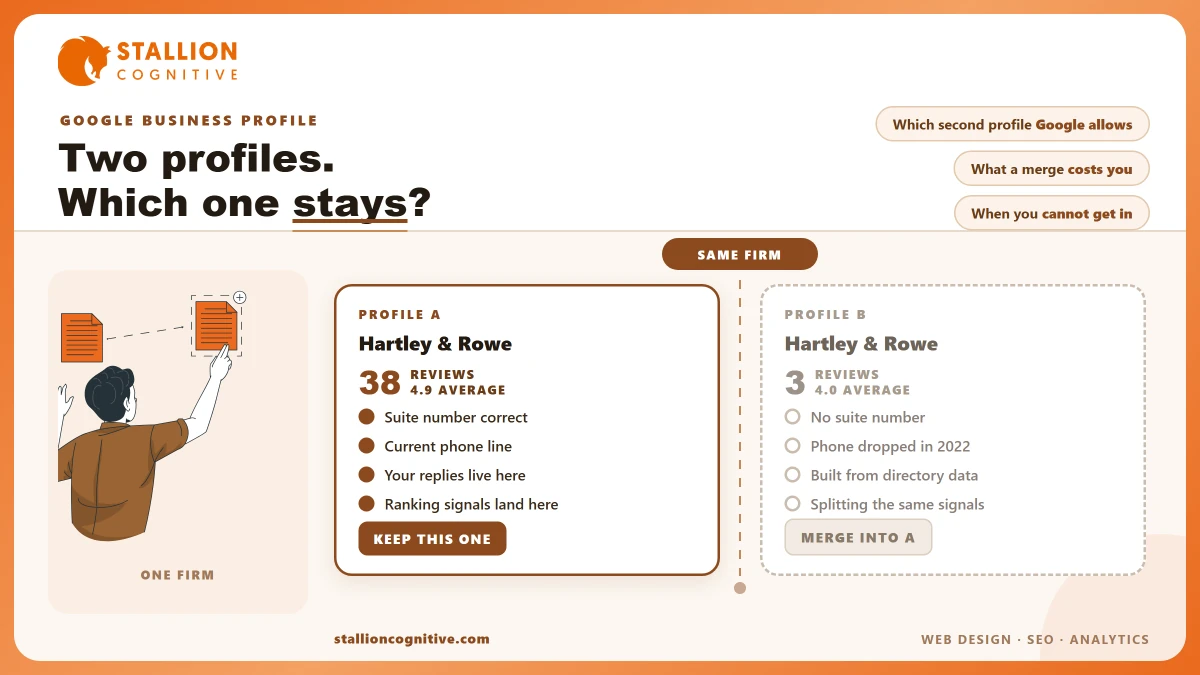
A partner searches the firm name to check the office number, and there are two of you. Same firm, two cards, two sets of reviews. The first has the suite number and forty-odd reviews. The other shows a phone number you dropped in 2022, three reviews, and a photo nobody in the building knows.
Both are indexed. Both can show. Google picks between them for you, several times a day, and it does not always pick the good one.
So the instinct is to delete the weaker card that afternoon.
Hold off for ten minutes. Two of the four ways to remove it will cost you review history you cannot get back, and one is close to permanent once Google accepts it.
How Do You Know You Actually Have a Duplicate?
Search the firm name in a private window. Search it again with your town added. Then open Google Maps and look up the street address on its own, because a card that hides from the first search often turns up on the third.
Your dashboard is the weakest test of the three. A profile somebody else verified will never show up in your account at all.
- Two cards for one name: The clearest sign, and the rarest, since Google usually hides one of them.
- A phone number you dropped: Old numbers sit on old cards long after the website gets fixed.
- Review counts that do not match: Forty on the card you manage and four somewhere else means two cards are collecting.
- A missing or wrong suite number: Auto-built listings drop the unit number all the time.
- Photos you never uploaded: Street imagery on a card nobody in your firm has ever touched.
Trust the map result over the search result when the two disagree. A firm that is not showing on Google Maps under one card is often easy to find under the other, which is the split this whole article is about.
Write down every version you find, with the address and phone number as shown. You will want that list in a moment, and rebuilding it later is slow work.
Where the Second Profile Came From
Almost nobody builds a duplicate on purpose. They arrive through normal staff changes and normal business changes, which is why firms like yours collect them faster than shops do.
- A former employee claimed it first. An office manager set one up years ago on a personal Google account, and it left when they did.
- A past agency built its own. Some agencies verify a card under their own login to keep reporting tidy, then hand over a login that leaves it out.
- Google built it from directory data. Unclaimed cards get pieced together from citations and public records, so they appear without anyone lifting a finger.
- You bought a practice. The old firm's card stays live with its own address and phone number.
- You moved office and made a fresh one. Starting again is easier than editing, and it leaves the old address behind as a live card.
- A partner added themselves. Well meant, sometimes allowed, and covered in the next section.
Cause four looks settled long before it is.
A merged practice can carry a second card for years while both firms' clients keep reviewing whichever one they find first, and the review history quietly splits down the middle.
Which Second Profile Does Google Allow?
Some of them are fine. Google's own Business Profile guidelines put the rule plainly.
"Do not create more than one page for each location of your business, either in a single account or multiple accounts."
Read the second half of that line, because it is the half firms miss. A second login buys nothing. The limit is per location, whatever the number of accounts involved, and whichever one your agency signs into.
The same page then carves out an exception, and it is the one that counts most at a financial or legal firm. Single practitioners and departments inside a bigger firm may hold their own cards. So a wealth management firm and a named adviser working there can both show up fairly, at one address, breaking nothing.
Service-area firms get their own rule. Google wants "one profile for the central office or location with a designated service area" rather than a card for each town you cover.
| What you are looking at | Google's rule | What to do |
|---|---|---|
| Two profiles, same firm name, same address | One location gets one profile | Merge them |
| Firm profile plus a named adviser's own profile | Practitioner exception permits both | Keep both, and differentiate the names and categories |
| A profile at an office you have left | One profile per current location | Correct the surviving profile, remove the old one |
| Two profiles, same building, different suite numbers, one firm | Still one location | Merge them |
| Separate offices with their own staff and service areas | One profile per location is allowed | Keep both |
| A listing you never created, built from directory data | Not yours until claimed | Claim it first, then merge |
Where the Practitioner Exception Backfires
An allowed pair still fights itself if you leave both cards looking the same. Two cards with one name, one category and one phone number teach Google nothing about which card answers which query, so it keeps guessing.
Pull them apart with these edits.
- Name them differently: The person's name on one card, the firm name on the other.
- Split the categories: What that adviser personally does, against the firm's main service.
- Point them at different pages: The adviser's bio page, and the firm's home page.
The pair stops competing the moment they stop matching.
What the Duplicate Costs You While It Sits There
Every signal you build splits across two cards. Reviews land on whichever one the client found, links point at whichever URL somebody copied, and the click data Google reads is halved before it is read.
Reviews are the part firms feel first. A card with 38 reviews at 4.9 beats two cards holding 19 each, and the numbers never favour the split. Which of your two cards did the last five reviews land on?
- Ranking dilution: Relevance and prominence both key off one card, so map pack position drops on both.
- The wrong number rings: An old phone number on the winning card sends new leads nowhere.
- Replies that look neglected: The card you never see piles up unanswered reviews in public.
- Directions to an old office: Clients turn up where you used to be, which is the complaint that finally surfaces all this.
- Suspension risk: Duplicates break policy, so a firm carrying one has less room left when something else goes wrong with a suspended Google Business Profile.
None of it breaks anything outright. That is what makes it costly, because a fault that never shows as an outage can run for two or three years while somebody decides local search just does not work for firms like theirs.
How Do You Merge or Remove It Without Losing Anything?
Google's route is a merge request rather than a delete. Its page on resolving duplicate profiles says to report a suggestion on Google Maps, that "the profiles must represent the same business and should have the same info," and that "all merge requests are subject to review."
Then comes the line worth reading twice. When cards combine, "their reviews are combined, but replies to reviews may be lost."
At a regulated firm that sentence has a price on it. Every reply you wrote was checked before it went out, and a hard-won answer to an awkward review is not something you want to write again from memory.
So copy your review replies into a document first. It takes fifteen minutes and it is the only backup that exists.
| Route | What happens to reviews | Effect on ranking | Timeline |
|---|---|---|---|
| Report a duplicate on Maps | Reviews combine, replies may be lost | Signals consolidate onto one profile | Subject to review, days to weeks |
| Request access, then merge in the dashboard | Reviews combine, replies may be lost | Signals consolidate onto one profile | Owner has three days to respond first |
| Mark the spare permanently closed | Reviews stay on a dead card in public | A closed label persists in Maps and search | Difficult to reverse |
| Delete the profile from your account | Reviews are removed with it | Review history is gone for good | Immediate and permanent |
Rows three and four are the ones to avoid, and they are also the ones that feel most natural. Semrush makes the same point from the agency side, warning that merging listings badly "could result in data loss and even harm your ranking in search results".
Work through it in this order.
- Decide which card survives. Pick the one with the most reviews and the right address, whatever login you happen to prefer.
- Make the two cards match. Name, address and phone number should be the same before you file, because a request on mismatched data gets turned down.
- Save the review replies from whichever card is being absorbed.
- File the merge through Maps, or from the dashboard if both cards sit in your account.
- Leave it alone. Editing either card part way through restarts the clock.
- Check again in a fortnight, and file once more if nothing moved rather than assuming it failed.
A single review cycle during the wait is normal. Two failed tries usually mean the data still does not match closely enough for Google to accept that both cards are one business.
What If You Cannot Get Into the Other Profile?
Somebody verified it, and that somebody is a former employee, a past agency, or the practice you bought. Google has a set path for this case, and the clock it runs on gives the other side a fixed window to answer before you get any say in it.
The sequence is fixed, so there is no point trying it out of order.
- Ask the current owner for access. They get three days to reply.
- Take the handover if they approve. The card moves to your account.
- Appeal if they refuse. Google reviews the refusal.
- Claim it if nobody answers. Silence past the deadline may let you take the card, though Google notes that option is not always offered.
- Suggest an edit in Maps when all of the above stalls.
Send the request from the Google account you mean to keep forever. A request sent from a marketing coordinator's login solves today's problem and builds the next one.
Suggesting an edit is slower and less certain than a merge. It is also the only lever left when the account holder has truly vanished.
Keep these two problems apart. A duplicate is a listing fault and a false review is a content fault, so if the spare card also carries something defamatory, report a fake review through the review process rather than hoping the merge takes it down.
The Checks That Stop a Third Profile Appearing
Duplicates come back, usually inside eighteen months, usually after a staff change nobody tied to local search.
- Ownership sits with a partner: The main owner should be a firm account that outlasts staff and suppliers.
- Agencies get manager access: Manager rights let them work without ever holding the card.
- Search the address quarterly: Two minutes in Maps catches an auto-built listing before it collects reviews.
- Fix citations at the source: Mixed-up directory data is what Google builds new cards from, which is why NAP consistency is a guard rather than housekeeping.
- Edit, never rebuild, after a move: Update the card you have, even when starting fresh looks quicker.
- Add it to the handover: A new hire with marketing duties should be told the card already exists.
The quarterly search is the one that pays for itself.
A card caught at two weeks old has nothing on it worth saving, so the fix is one merge request instead of the review-rescue job described above. Who owns that two-minute check at your firm right now?
Firms that treat the card as an asset with a named owner stop having this problem. Firms that treat it as a job somebody did once keep having it, and that upkeep is part of what local SEO cost actually buys.
Where This Leaves You
Find every version first, decide which one lives on reviews and address accuracy, save the replies, then file a merge. Skip the closed label and skip the delete button, because those two trade a tidy dashboard for review history you spent years earning.
What follows is the short version for whoever has to sign this off.
- A second card is not always wrong: The practitioner exception is real, and merging a permitted pair throws away a legitimate listing.
- Replies are what the merge risks: Reviews survive it and replies may not, so save them before you file.
- The fix is cheap early: A fresh listing has no history to move, which is why the quarterly check beats the annual clean-up.
Say you have found two cards and cannot tell which one ranks, or whether the exception covers yours. That is a short job with a clear answer at the end, and we sort out listing conflicts for financial and professional firms as part of local search work. Have your profiles checked before the next review lands on the wrong card.
Frequently Asked Questions
How long does Google take to action a merge request?
Most requests clear inside two to three weeks, and some settle in days. Google reviews every one by hand, so there is no status bar to watch. File once more if a fortnight passes with no change.
Will our star rating change once the profiles combine?
The combined rating is worked out again across both review sets, so absorbing a weaker card can move the average either way. A card with 40 reviews at 4.9 will barely shift when it takes on four at 3.0.
Do we need to update our citations after the duplicate is gone?
Worth doing, and it is the step that stops a repeat. Directory records still holding the old address or phone number are the raw material Google uses to build a fresh card.
Can a competitor create a profile for our firm?
Anyone can add a business to Maps, so it does happen. Claiming your own card and verifying it is the real guard, since a verified card is far harder for a stranger to change.
Do two suites in one building count as two locations?
Only when each runs as a separate business with its own staff and service area. A single firm spread over two floors gets one card, and splitting it invites a merge you did not ask for.