
Your site looks fine to you.
It looks fine because you arrive by typing the address, while a hacked page usually shows itself to people coming from a search. The visitor sees one thing and the owner sees another.
That is why the news normally arrives sideways. A client mentions something odd, a form stops sending, or your listing picks up a warning that nobody at the firm put there.
Knowing how to tell if your website has been hacked is mostly about knowing where to look.
The five signs a firm notices first
None of them looks like a hack at the start.
They look like small faults, which is why weeks pass before anybody joins them up.
- Search results that are not yours: Pages appear under your domain for words your firm would never use.
- A warning next to your listing: A label shows in the results, or the browser puts up a full page warning before your site loads.
- Traffic falling for no reason: Sessions drop with no campaign change behind it, which is a common first reading of a traffic drop.
- Mail stops arriving: Your domain gets used to send spam, and legitimate mail starts going to spam at the other end.
- A client says something strange happened: Somebody was sent somewhere else, or asked for a login your firm does not run.
The pattern to notice is that four of the five reach you through somebody else. Your host is rarely the one who tells you, since shared hosting watches the server instead of the pages you publish.
Check the site the way a stranger would. Search your firm name, click the result, and see what a phone shows you instead of what your office desktop does.
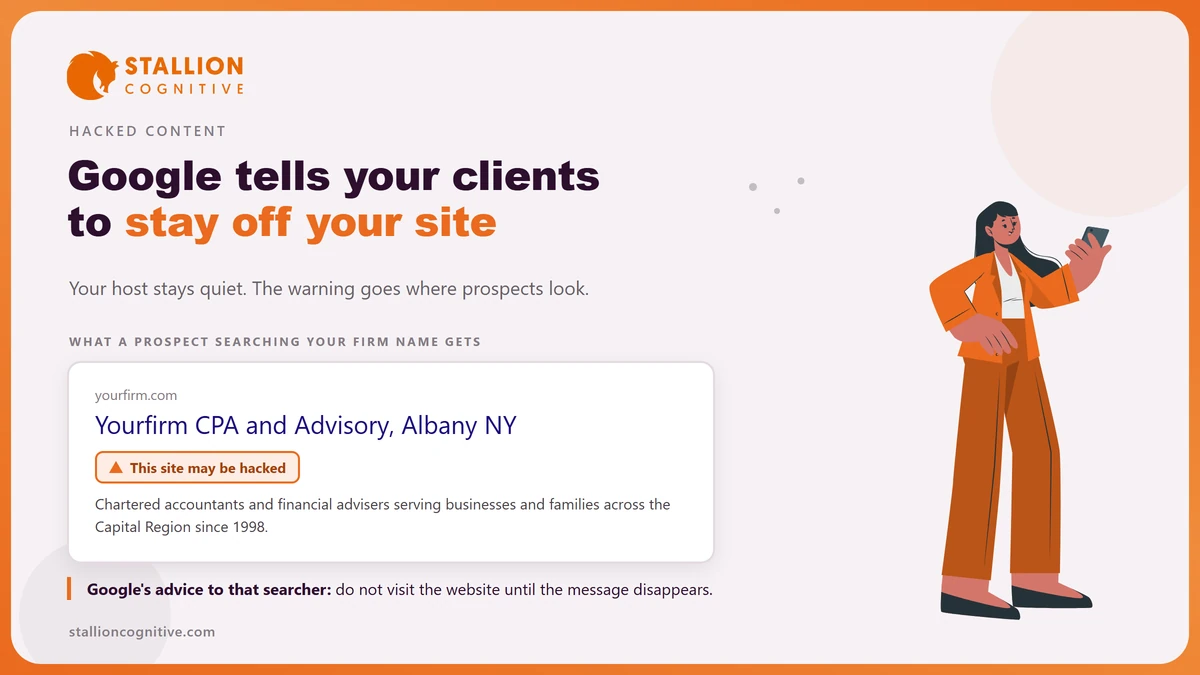
What does Google show a searcher when your site is flagged?
Owners underestimate this part. Google does not quietly note the problem and wait for you.
Its Security Issues report explains that pages hit by a security issue "can appear with a warning label in search results or an interstitial warning page in the browser when a user tries to visit them."
The wording shown to the person searching is blunter still.
If you visit the site, you could be redirected to spam or malware.
Google's support page for that warning goes further and advises the searcher that "you don't visit the website until this message disappears from the search result."
So a prospect looking for your firm by name is told to stay away by the most trusted brand in the room.
The damage to your name runs ahead of the damage to the code, and it lands on people who were already looking for you.
Nothing here says your pages get deleted from the index.
The harm is the warning, the full page block and the clicks that stop.
Where to look in Search Console
Open Search Console and read the Security Issues report first. Google states that if its evaluation "determines that your site was hacked, or that it exhibits behavior that could potentially harm a visitor or their computer", the report will show what it found.
Work through it in this order.
- Open Security Issues and read whether Google names hacked content, malware or social engineering.
- Expand the sample URLs, since Google lists examples and not every affected page.
- Run a site search for your domain and skim for pages you did not create.
- Fetch a few of those URLs on a phone, because some payloads only fire for mobile visitors arriving from search.
- Check the report again after any fix, and request a review only once the pages are properly clean.
Firms that have never opened the tool tend to find other faults at the same time, and a site that has quietly stopped showing on Google sometimes has a security reason behind it.
Bear in mind that a clean report is not proof of a clean site. Google reports what it has evaluated, so a fresh compromise can sit there for a while before anything appears.
What kind of hack is it?
Google sorts them by what the attacker did to your pages.
The label matters because it tells you where to look. Its spam policies define hacked content as "any content placed on a site without permission, due to vulnerabilities in a site's security."
| What it is | What the attacker changed | What you would see |
|---|---|---|
| Code injection | Code added inside your existing pages | Nothing obvious, until a scanner or a browser flags it |
| Page injection | New pages created on your domain | Unknown URLs appearing in a site search |
| Content injection | Text or links added to real pages | Odd wording or links buried in a page you wrote |
| Redirects | Visitors sent elsewhere on arrival | A page that works for you and not for a searcher |
Google describes the mechanism plainly, saying that when hackers reach a site "they might try to inject malicious code into existing pages", and that a redirect can be built to send "some users to harmful or spammy pages."
Read the word "some" carefully.
Picky redirects are why the owner check fails so often, and why one page can behave three ways for a phone, a search visitor and you.
What the law asks of an accounting or advisory firm
Here the topic stops being an IT problem. For a tax or accounting practice, the federal position is already written down, and it applies whatever the size of the firm.
The IRS publishes a plan template, and its language leaves little room.
Not only is a WISP essential for your business and a good business practice, the law requires you to have one.
That comes from Publication 5708, the IRS guide to building a written information security plan. It explains that under the Gramm-Leach-Bliley Act and the FTC Safeguards Rule, "tax and accounting professionals are considered financial institutions, regardless of size", that keeping such a plan is a requirement of the rule, and that the plan "must be written and accessible."
The IRS is realistic about what a five-person practice can carry.
- Does it scale to a small firm? The IRS says a plan "should be appropriate to the company's size, scope of activities, complexity, and the sensitivity of the customer data it handles", and states there is no one-size-fits-all version.
- Is it a one-off document? The same guide calls it an evergreen document meant to be reviewed, tested and updated as the practice changes.
A hacked website is the moment somebody asks to see that plan.
Writing it after the event is the expensive order, and it is the order most firms end up in.
The 30 day clock most firms have never heard of
A separate rule turns a breach into a deadline. Since 13 May 2024 the FTC's Safeguards Rule has carried a notification requirement, and the numbers in it are specific.
| The question | What the rule says |
|---|---|
| What counts as the trigger | An acquisition of unencrypted customer information without the authorization of the individual to which the information pertains |
| How many people | A security breach involving the information of at least 500 consumers |
| How long you have | As soon as possible, and no later than 30 days after discovery |
A firm meeting those numbers for the first time usually has three questions.
- When does the clock start? At discovery, so the day a client mentions something odd may already be day one.
- What counts as taken? The trigger turns on unencrypted information, so the answer depends on what your site stores and how.
- Could a small firm reach 500? One spreadsheet of client records gets there faster than most partners expect.
None of this is legal advice, and the point is narrower. Somebody at the firm should know these three numbers well before an incident.
What to do in the first day
Move in an order that protects evidence. The urge to delete everything wipes out the record of how they got in.
- Take the site offline or into maintenance mode, and tell the team to stop editing it.
- Ask your host for a copy of the current files and database before anything is changed.
- Change every password and reset the keys, including hosting, the site admin, database and email.
- Write down when you noticed, what you saw and who you told, with times.
- Restore from a backup made before the first sign, then patch what let them in.
- Ask whether client information was reachable, since that question drives the deadline in section 6.
Restoring without patching gets you hit again within days, which is the usual way a firm ends up cleaning the same site three times. If the fix turns into a rebuild, the search side of that work is the same care needed for a WordPress migration.
Once the site is clean, watch your logs for a fortnight.
Traffic settles slowly, and telling a fresh problem from ordinary bot traffic takes a little practice.
Where that leaves your site
A hacked website is a client-facing problem long before it is a technical one. Google puts a warning where your prospects are looking, your host stays quiet, and the federal rules that apply to a financial firm were written long before any of it happened.
- Open Security Issues today: It takes two minutes, and knowing the report exists is most of the value.
- Ask who holds the plan: A tax or accounting practice is expected to have a written one already.
- Fix the way in as well as the mess: A restore without a patch buys you a fortnight.
The dull work is what prevents all of it. Updates applied on a schedule, backups somebody has actually tested, and a person whose job it is to look. That is what our website care plans cover, and it is cheaper than the week you would otherwise spend on this, or you can start with the wider audit signs if you would rather look first.
Frequently Asked Questions
Our host says the server is clean. Are we fine?
Server scans and page-level compromises are different things. A host can report healthy infrastructure while injected content sits inside your pages, so check what a searcher sees before accepting the all-clear.
How long does the warning take to disappear?
Google lifts it after a review, and the review only succeeds once the pages are actually clean. Requesting one too early restarts the wait and teaches you nothing.
Does a hack hurt our rankings permanently?
Recovery is normal once the pages are clean and reviewed. Lasting damage usually comes from the weeks spent flagged rather than from the compromise itself.
Should we tell clients before we know the details?
Say what you know, when you know it, and keep a written note of every step. Federal rules impose their own timing on firms holding customer information, so raise it with your adviser early.
Can a small brochure site really be a target?
Attacks are automated and they scan for a known weakness, so nobody chooses you. A five-page site running an unpatched plugin is found the same week as anybody else.