
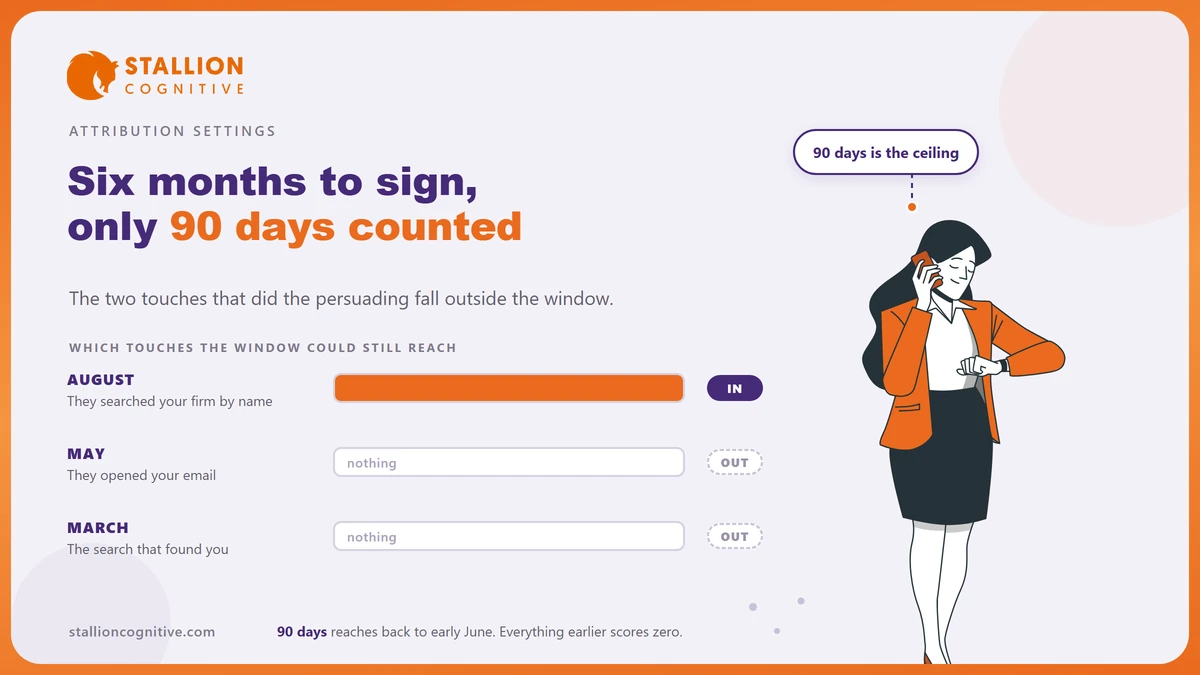
Your best client found you in March and signed in September.
Google Analytics was still watching, and it recorded the signature.
What it no longer remembers is the search that started the whole thing.
Google Analytics attribution runs on a clock, and the longest setting it offers is 90 days. Everything older than that window falls outside the maths.
So the report names the channel that was nearest the finish line.
What Google Analytics attribution actually decides
It decides which of the visits before a signup gets named as the cause.
A client may find you through a search, come back through your newsletter, then arrive by typing your name. Analytics has to pick. The rules it uses are settings somebody chose.
The settings that decide it sit on one screen in Admin.
- The reporting model: The rule for splitting credit across the visits it can see. Data-driven splits it in fractions, and last click hands it to one.
- The lookback window: How far back it is willing to look before it stops. Anything earlier is treated as though it never happened.
- Who can change them: Google states that you "must be a Marketer or above at the property level to select the attribution settings", so this is not a view-only screen.
The window is the one nobody touches.
It ships with a number in it, somebody accepted that number years ago, and it quietly decides what your reports are able to say.
The window that stops counting at 90 days
Google defines it plainly. The key event lookback window "determines how far back in time a touchpoint is eligible for attribution credit", and its own worked example is a 30-day window where January key events are credited "only to touchpoints occurring from January 1-30."
The defaults differ by event type, and the ceiling is what matters.
| What is being counted | Default window | What else you can pick |
|---|---|---|
| First visit or first app open | 30 days | 7 days |
| Everything else, including your enquiry form | 90 days | 30 days or 60 days |
Ninety days is the top of the range, and there is no setting for six months.
Google also notes that the window you pick "also applies to session attribution", so the choice reaches past the key event reports. One dropdown reaches further than the screen lets on, which is worth knowing before somebody changes it to tidy up a chart.
What happens when your sales cycle outruns the window?
The first touch disappears from the record.
The visit itself stays in your traffic reports. What goes missing is the link between that visit and the client who eventually signed.
Walk it through with a real enquiry.
- In March a prospect searches for a question your firm answers, reads the page and leaves.
- In May they come back from your email and download the fee schedule.
- In August they search your firm by name and book a call.
- In September they sign, and Analytics looks back 90 days, which reaches early June.
- March and May both sit outside that reach, so the search and the email earn nothing.
Your report now says the brand search produced the client.
Brand search always looks strong, because it sits closest to the decision and it is where people go once they already know who you are.
So your report covers the last quarter of a six-month story, and the two touches that did the persuading are not in it. Firms with a long sales path get this most often, and it is one reason where leads come from rarely matches what partners believe.
Which setting rewrites your old reports?
The model does, and the window does not.
That difference catches people out, because both settings sit on the same screen and look just as harmless.
| Setting | What it changes | Does it touch past data? |
|---|---|---|
| Reporting attribution model | How credit is split across visits | Yes. Google says the change "applies to historical and future data" |
| Key event lookback window | How far back credit can reach | No. Changes "apply going forward" only |
So switching the model redraws every report you have ever run, and last quarter's numbers move under you. Widening the window fixes nothing that already happened and starts helping from the day you set it.
Set the window today for the clients who sign next spring.
There is an order to this.
Widen the window first and leave it alone, then compare like with like from that date onward, and keep a note of when you changed it so nobody reads the step as a trend.
What changed on 11 August 2026
Google added custom windows, and the detail worth catching is where they live. The release note says conversions "now support custom integer lookback windows for click-through conversions (CTC) and engaged-view conversions (EVC)."
Click-through windows can now be any whole number from 1 to 90 days, where the old list offered 1, 7, 14, 30, 60 or 90. Engaged-view windows run from 1 to 30 days, against a fixed 3 before.
Read the location line closely, because it is a different screen.
- Where does it sit? Under Advertising, then Conversion management, then Settings.
- What does it govern? Conversions shared with Google Ads, including the linked Ads interface.
- What does it leave alone? The property-level key event window from section 2, which stays exactly where it was.
- Who does it help? Firms running paid campaigns with a slow follow-up, since the old preset list forced a rounding.
A firm that runs no ads gains nothing here.
A firm that does can finally set 45 days and mean it, instead of rounding to whichever preset sat nearest its real follow-up time.
Why last click flatters the channel nearest the signature
The problem is older than GA4, and the research has covered it for years. Li and Kannan, writing in the Journal of Marketing Research in 2014, found that last-touch attribution significantly underestimates what email, display ads and referrals add to conversions.
The economics point the same way. Ron Berman's 2018 paper in Marketing Science reports that the popular last-touch method "is shown to over-incentivize ad exposures, often resulting in lowering advertiser profits."
A report built on last click describes the end of a relationship, and the budget gets set from it anyway.
Neither finding says last click is useless. Both say it moves money toward whatever sits closest to the signature.
For a professional firm that means brand search and direct visits, and a budget cannot buy more of either. Cutting the blog or the email that created the brand search is the mistake the report invites, and it takes a year to notice.
Credit is not the same as cause. Read the model as one opinion about your data, then check it against what clients tell you at the first meeting.
What to set, and who is allowed to set it
Start with the lookback window.
It is the setting with a ceiling on it, and the one that needs time to pay off.
- Open Admin, then Attribution settings at property level, and write down what is there now.
- Set the key event lookback window to 90 days unless you have a reason to run it shorter.
- Leave the reporting model alone for now, since changing it redraws history and muddies the comparison.
- Note the date of the change somewhere your reports can see it.
- Ask your three newest clients how they first heard of you, and keep the answers next to the report.
That last step is the cheap one and it settles arguments. Analytics can only see what it can see, so a client who first heard your name at a seminar arrives as direct traffic no matter what you set.
In the accounts we take over, we almost always find the window sitting at its default, untouched since the property was built.
If the numbers still look wrong after that, the fault is usually further back in how the site records an enquiry at all, which is the ground covered by website health numbers and by whether you need Google Analytics configured the way it currently is.
Where that leaves your report
Google Analytics attribution is a set of choices somebody made, and the defaults were built for businesses that sell faster than yours. A 90-day ceiling on a nine-month sale gives you a report that is both true and misleading.
- Widen the window today: It only helps going forward, so every week you wait costs you a week.
- Change the model rarely: It rewrites history, and comparisons stop meaning anything.
- Ask clients directly: One question at the first meeting beats any model.
Your reports also stop reaching back for a second reason, since data retention limits decide how far the raw data survives at all, and comparing tools is easier once you know Analytics against Search Console. If you would rather have someone read the whole picture with you, that is what our strategy session is for.
Frequently Asked Questions
Will widening the window change last quarter's numbers?
Window changes apply to new data only, so your past reports stay exactly as they were. You will see the effect build over the following quarter as fresh signups start reaching further back.
Which model should a small firm use?
Data-driven is the sensible default because it splits credit in fractions across the path. Last click is easier to explain to a partner meeting and worth keeping as a second view.
Does any of this affect Google Ads reporting?
Ads keeps its own conversion windows, and the August 2026 controls sit on that side of the wall. Misaligned settings between the two are a common reason the numbers disagree.
Our biggest channel is direct traffic. Is that normal?
Direct absorbs anything the browser did not label, including app clicks, PDF downloads and people typing your name. A large direct share usually points at missing tagging somewhere upstream.
How long before the new window shows in reports?
Give it a full sales cycle before you judge it, since the window can only reach back for signups recorded after the change, and week one will show you nothing worth reading.