
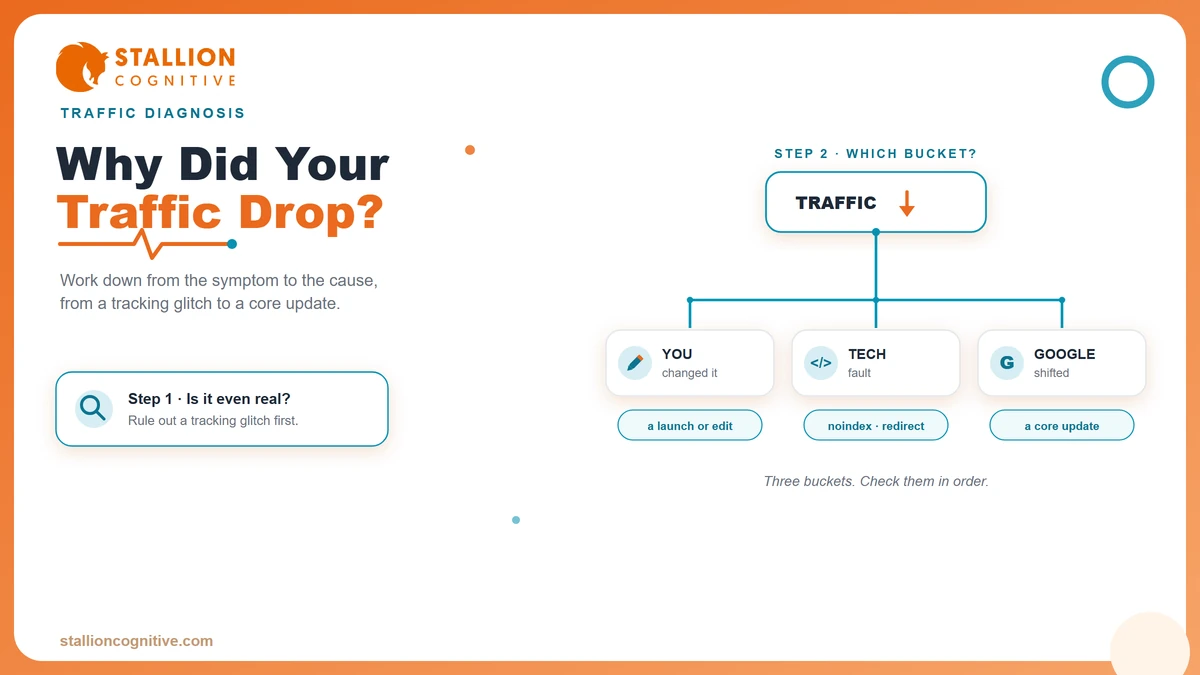
Your website traffic dropped, and you want the real reason before you lose another week of leads. The good news is that a traffic drop has a short list of usual suspects, and you can work through them yourself in about an hour. Some turn out to be nothing. A few need real work. One or two mean it is time to bring in help.
We audit sites for a living, and most panicked calls trace back to the same handful of problems. The skill is checking them in the right order. That way you fix the real cause instead of guessing.
So below is the full diagnosis, cause by cause, from the harmless to the serious. Let's get into it.
First, Is It a Real Drop or a Tracking Glitch?
Before you assume the worst, confirm the drop is real. A shocking number of "my traffic vanished" scares turn out to be a broken tag or a reporting quirk, and you do not want to rebuild half your site chasing a ghost.
Rule out the fakes first. Check these before anything else.
- Broken analytics tag: A site update or a new plugin can strip your tracking code, so real visits stop being counted while nothing is actually wrong.
- A reporting gap: Analytics platforms have outages and data delays. Compare two tools before you trust one.
- Filtered or bot traffic: A spam filter change or a bot surge can make a normal week look like a cliff.
- The date range: Weekends, holidays, and Mondays all skew. Compare like with like, month over month, rather than against your best day ever.
Cross-check Google Analytics against Search Console. If Search Console still shows steady clicks and impressions while Analytics shows a crater, your problem is tracking, and you can breathe.
Once you confirm the visitors really did leave, the next job is figuring out where they went.
Three Buckets Every Traffic Drop Falls Into
Every organic traffic drop comes from one of three places. Something you changed, something technical, or something at Google. Naming the bucket first saves you hours, because each one is checked in a completely different spot.
The table sorts them fast.
| Bucket | What it looks like | First place to check |
|---|---|---|
| You changed something | Drop starts right after a launch, redesign, or edit | Your own change log and recent edits |
| A technical fault | Pages fall out of Google, crawl errors appear | Search Console Pages and Indexing reports |
| Google shifted | A gradual slide across many pages on an update date | Search Status Dashboard and a rank tracker |
Start with the bucket that matches your timeline. If traffic fell the day after you relaunched the site, that is your answer, and you can skip the hunt for a Google update.
Google's own debugging traffic drops guidance names six causes worth knowing, from technical issues to seasonality. The buckets above are just a faster way to decide which one to chase first.
Which bucket does your drop sit in? Hold that thought, because the next sections walk each one down.
Did a Google Core Update Hit Your Site?
If your rankings slid across a lot of pages at once, and the slide lines up with a date in the news, a Google core update is the likely cause. These are broad, automated reviews of quality that Google rolls out every few months. They can move a site up or down without you touching a thing.
You can confirm it in three checks.
- Match the date: Note the day your traffic changed, then compare it against the Google Search Status Dashboard, which logs every confirmed update and its rollout window.
- Look at the spread: A core update hits broadly, so many pages dip together. A single page tanking alone points to a different cause.
- Watch the volatility trackers: When the whole industry is shouting about ranking swings on the same day, you are almost certainly looking at an update rather than something you did.
Core updates are not punishment. They reflect Google reweighing what counts as helpful, reliable content, which is why finance and other regulated sites feel them harder. Those pages are held to a higher trust bar, so a quality-focused update tends to reshuffle them more.
If the dates match and the drop is broad, you are dealing with an algorithm change. That raises the next question owners always ask.
Penalty or Algorithm Change, and How to Tell
A penalty and an algorithm update feel identical from your traffic chart, but they are different problems with different fixes. The fastest way to tell them apart is one report inside Search Console.
Open the Manual Actions report. If a human reviewer at Google has taken action against your site, a message here spells out why. An empty report means no penalty, and your drop is algorithmic.
The table lays out the split.
| Question | Manual penalty | Algorithm update |
|---|---|---|
| What it is | A human reviewer's action | An automated ranking change |
| Where you see it | A message in the Manual Actions report | No message, matches an update date |
| Usual trigger | A guideline violation like spam or unnatural links | A broad quality reassessment |
| How you fix it | Fix the issue, then request a review | Improve quality and wait for reprocessing |
Manual penalties are rarer than people fear, and they come with instructions. Algorithm drops are quieter and more common, and they ask more patience than paperwork.
Most owners who brace for a penalty find an empty report and an update date instead. That is usually the better news, even if the recovery takes longer.
Technical Causes Most Owners Miss
When a specific set of pages drops out of Google entirely, the cause is almost always technical rather than editorial. These faults are easy to create by accident and, thankfully, among the quickest to fix once you spot them.
Run down the usual technical culprits.
- A stray noindex tag: A developer or plugin can leave a "noindex" instruction on live pages, which quietly tells Google to drop them from search. It is the single most common self-inflicted wound we see.
- A blocked robots.txt: One wrong line in this file can wall crawlers out of whole sections of the site.
- A broken migration: Moved the site or changed URLs without proper 301 redirects? Old links now hit dead ends, and the ranking equity they carried drains away.
- Slow, unstable pages: A sudden speed regression hurts. Check your Core Web Vitals, because a page that got heavy or shaky can slip in rankings.
- A mobile breakage: Google judges the mobile version first, so a layout that broke on phones can drag rankings even when the desktop site looks fine. Confirm the site is still mobile-friendly.
Use the Search Console Pages report to see exactly which URLs fell out and why. It will name the reason, whether that is a noindex, a crawl block, or a redirect error.
Fix a technical fault and recovery is often fast, because you are removing a barrier rather than rebuilding trust. That is the opposite of a quality drop, which we get to next.
Are You Losing to Fresher Pages?
Sometimes nothing broke and no update landed. Your page simply aged while competitors published something better, and Google quietly swapped you out. This slow bleed is content decay, and it is a different animal from a sudden crash.
The tells are gradual rather than overnight.
- A slow monthly slide on a page that used to hold steady, rather than a single sharp drop.
- Outdated specifics like old dates, prices, or stats that make the page look stale next to newer rivals.
- A stronger competitor now sitting above you with a deeper, more current take on the same query.
Because this cause creeps in over months, it needs its own detection routine, which is why we walk through how to spot and reverse content decay separately. The short version is that refreshing and deepening a fading page usually wins the position back.
If your drop is a gentle slope rather than a cliff, decay is the likely story. If it is a cliff, keep reading, because a newer force is pulling clicks off the results page entirely.
What AI Overviews Are Quietly Taking
Here is a drop that has nothing to do with your rankings at all. You can still sit at position one and watch clicks fall. Google now answers many searches right on the results page with an AI Overview, so the user never comes through.
The effect is measurable. Ahrefs studied 300,000 keywords and found that when an AI Overview appears, the position-one click-through rate falls 58%. Your ranking held. Your clicks did not.
You can rank first and still lose traffic, because the answer now lives on the results page instead of yours.
So what do you do about it? A few moves help.
- Check impressions against clicks: In Search Console, steady impressions with falling clicks is the fingerprint of an AI Overview or a zero-click search eating your traffic.
- Target deeper intent: Queries that need real detail, comparison, or a decision still pull the click, because a one-paragraph answer cannot satisfy them.
- Earn the citation: Clear, well-structured answers are what these systems quote, and a quoted source still gets seen and sometimes clicked.
The shift is structural rather than a fault you caused. The response is to write pages worth leaving the results page for, then track the click rate instead of the ranking alone.
How to Recover, and How Long It Takes
Recovery speed depends entirely on the cause, so set your expectations by the bucket you landed in. A technical fix can restore traffic within days. A quality-based drop asks for real patience.
Work the recovery in this order.
- Fix the fast stuff first: Remove a bad noindex, repair broken redirects, restore the tracking tag. These win traffic back quickly because you are clearing a blockage.
- Address quality for update drops: If a core update hit you, improve the actual pages. Strengthen depth, accuracy, and the on-page SEO signals that show expertise and trust.
- Resolve any penalty: Fix the flagged violation, then submit a reconsideration request through the Manual Actions report.
- Then wait, and keep improving: Quality changes are not instant.
Be realistic about the clock. On core-update recovery, Google states plainly that changes "could take several months", and that if you see no movement, you may be waiting until the next core update rolls out. No button reverses it overnight.
The firms that recover treat the drop as a prompt to improve the site for real, rather than to game their way back. That work compounds, and it holds through the next update instead of collapsing again.
Ready to Find Your Drop's Real Cause?
You now have the full checklist, from ruling out a tracking glitch to reading a core update and spotting the technical faults owners miss. Most drops reveal themselves once you check the causes in order.
Some do not, and a diagnosis that drags on costs you leads every week it stays unsolved. When the cause hides or the recovery stalls, a professional set of eyes finds in an afternoon what can take an owner weeks. Our digital strategy work pairs a full technical and content audit with a recovery plan built for your site. It starts by tracing the drop to its root. It also flags the signs your website is outdated that quietly drag performance long before a crash.
So what is your traffic chart telling you right now? Book a call and we will pinpoint the cause and map the way back.
Frequently Asked Questions
How big a traffic drop should actually worry me?
A dip under 10% week to week is usually noise, especially across weekends or holidays. Worry when a fall is sharp, sustained past a few days, and shows up in Search Console clicks rather than in your analytics tool alone. Sudden and site-wide beats small and gradual for urgency.
Will changing web hosts or platforms hurt my rankings?
Done carelessly, a move can drop traffic hard through lost redirects, changed URLs, or slower load times. Done with a proper redirect map and a pre-launch check, rankings usually hold and sometimes improve. The risk lives in the migration process rather than the move itself.
How do I tell a seasonal dip from a real drop?
Compare the same period against last year rather than last month. Many businesses fall every December or every summer and rebound on schedule. When this year's dip matches the same weeks last year, it is seasonality doing its normal thing, so hold steady.
Does a traffic drop make my rankings fall even further?
Falling clicks alone will not spiral your rankings downward, since Google does not rank pages on raw traffic. What does compound is the original cause left unfixed, like a technical fault or a quality gap, which keeps costing you position until you address it directly.
How often do Google core updates happen?
Google rolls out broad core updates several times a year, usually every two to four months, alongside smaller updates in between. Each one can take weeks to fully roll out. Tracking the Search Status Dashboard tells you when one is live so you can line it up against your own dip.