
Most people who visit your firm's website leave without touching the contact form. They had a question, the form offered a mailbox, and the moment passed.
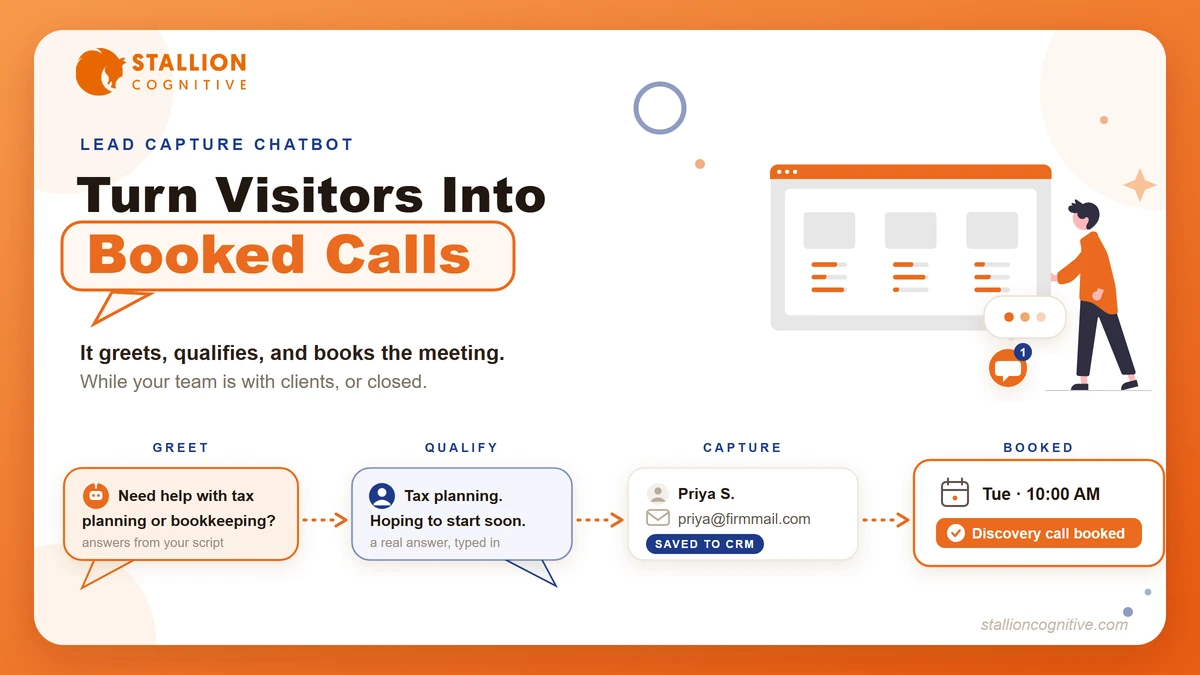
A lead capture chatbot changes that exchange. It greets the visitor, answers the first few questions from a script you approve, and asks for a booking while the interest is still warm.
In this post we'll cover what these chatbots do, how they compare with forms and live chat, what a compliant setup looks like for advisors, accountants, and law firms, and what one costs to run. Let's get started.
Why Contact Forms Quietly Lose Financial-Firm Leads
A contact form only works when a visitor is already committed to you. Everyone still comparing firms clicks away, and much of your traffic arrives at night or on weekends, when a message sits unanswered until the next business morning. By then the prospect has often spoken with someone else.
We see this pattern constantly in the website lead capture setups firms ask us to review. The site ranks, the traffic shows up, and the pipeline stays thin.
The form itself is the bottleneck. It asks for commitment before it gives anything back.
Think about the last time you typed your phone number into a form on a site you didn't already trust. You paused, didn't you? Your prospects pause the same way, and on a firm's website that pause has a short shelf life.
Three things make the damage worse for firms like yours.
- Delayed response: A person weighing a financial or legal decision is usually talking to two or three firms. The first useful reply tends to win the meeting.
- One-way exchange: The visitor wanted an answer about fees, process, or fit. The form collected their email and answered nothing.
- Zero qualification: When a reply does go out, your staff still doesn't know if this is a $200 question or a six-figure client.
A form is a mailbox. What your website needs is a receptionist for its busiest hours, which are the hours you're closed.
What Does a Lead Generation Chatbot Actually Do?
A lead capture chatbot is a small chat window on your website that starts a conversation, answers common questions from an approved script, asks a few qualifying questions, and collects the visitor's name, contact details, and a meeting booking. Good ones plug into your calendar and CRM, so follow-up starts without anyone checking an inbox.
The flow is simpler than the label "AI" suggests.
- Greet: The widget opens with a specific, useful prompt. "Looking for help with tax planning or bookkeeping?" beats "How can I help you today?"
- Answer: It handles the common first questions about services, process, and fees from copy you wrote and approved.
- Qualify: It asks two to four short questions that tell you whether this visitor fits the firm.
- Capture: it collects name, email, and phone at the natural point in the chat, after it has given value.
- Book or route: qualified visitors pick a slot on your calendar. Everyone else gets a helpful answer and a lighter follow-up path.
Notice what's missing from that flow. There's no open-ended AI riffing about markets or case law. For a regulated firm, the chatbot's job is intake, and the script does the talking.
Service teams got here first. In a Gartner survey, 85% of customer service leaders said they would explore or pilot customer-facing conversational AI in 2025. The same shift is reaching intake, and it sits inside the broader AI automation wave firms are already sorting through.
The chatbot is the website's half of a bigger pattern. Its phone-line sibling is the AI receptionist, which catches the calls your front desk misses. Same logic, different channel.
Chatbot vs Contact Form vs Live Chat: Which Converts Better?
The hybrid wins. A chatbot that qualifies visitors and hands the good ones to a human outperforms both a static form and a purely human live chat, because it responds instantly and never leaves a message hanging.
The cleanest evidence comes from HubSpot's own experiment. When the company replaced its live-chat-only setup with a chatbot that triaged and qualified first, 75% more people engaged, over 55% of them answered the qualifying questions, and the hybrid setup produced 182% more qualified leads. The test is a few years old now, and the tools have only improved since.
The part of that study most firms skip past is the "before" picture. Under live chat alone, over a third of the people who started a conversation never heard anything back. Live chat looks personal on paper. In practice it's a staffing commitment most small firms can't keep, and every unanswered chat is a prospect who watched you ignore them.
How do the three channels stack up side by side?
| Criterion | Contact form | Live chat | Lead capture chatbot |
|---|---|---|---|
| Response time | Hours to days | Instant, when staffed | Instant, always |
| After-hours coverage | None | Rare | Full |
| Qualifies the lead | No | Sometimes | Yes, by design |
| Books the meeting | No | Manually | Automatically |
| Staffing needed | Someone to reply | Dedicated coverage | Script upkeep only |
| Failure mode | Silent inbox | Ignored chats | A stale script |
Every channel fails somewhere. The difference is that a chatbot's failure mode, an outdated script, is the only one you can fix in an afternoon.
A lead generation chatbot also compounds the SEO work you've already paid for. Ranking brings the visitor. Capture decides whether the ranking was worth anything.
What Should an AI Chatbot Ask? Qualifying Questions by Profession
The script matters more than the software. Two to four short questions, asked in plain language, will tell you who's on the other end without feeling like a quiz. The right questions differ by profession, and so do the compliance rails around them.
What counts as a good chatbot qualifying question? One whose answer changes what your team does next. Everything else is friction.
For financial advisors
A chatbot for a financial advisor website has one hard boundary. It must never produce anything that reads as personalized investment advice, because marketing and communications in this industry are regulated and archived.
Keep the flow to intake.
- "What brings you here today?" with options like retirement planning, a 401(k) rollover, or a general portfolio review
- "When are you hoping to get started?"
- An optional question with asset ranges, framed as "so we can match you with the right advisor"
Put your standard disclosures in the widget's footer, keep every script version on file, and archive transcripts with your other client communications. Your compliance officer should sign off on the script the same way they sign off on your local SEO for financial advisors pages and every other page on the site.
For accountants and CPA firms
An accounting firm's chatbot earns its keep in the season when nobody has time to answer the phone. From January through April it can triage while your team works.
Three questions usually cover it.
- "Are you looking for help as an individual or a business?"
- "Which service do you need?" with tax preparation, bookkeeping, payroll, and advisory as options
- "Is there a deadline you're working against?"
Deadline urgency is the qualifier that matters most here. A visitor with a filing date two weeks out is a different conversation than one planning next year, and your bot can route them differently.
For law firms
An AI chatbot for a law firm website carries the strictest rails of the three. Bar advertising rules apply to its copy, and the widget must state plainly that chatting does not create an attorney-client relationship.
Ask for the practice area, the state or county, and a rough timeline. Nothing deeper than that. Ask visitors not to type case details into the chat, and hold those for the meeting, after a conflict check has cleared.
Handled that way, the bot does exactly what a careful front desk does. It finds out whether the caller is in the right place, then gets them on the calendar.
How to Build a Lead Generation Chatbot Without Rebuilding Your Website
Nearly every major chatbot installs by pasting one small script into your site's header or through a plugin. Your pages, design, and rankings stay untouched. The build effort goes into the script, and that's the harder and more valuable half.
If you're evaluating the best AI chatbot for a service business website, judge the fit on five points before price.
- CRM and calendar hookup: The bot must write leads into the system your team already uses. A chatbot with its own separate inbox just builds a second silent mailbox.
- Script control: You want full say over every answer it gives. For regulated firms, avoid tools that make up answers you never wrote.
- Load order: The widget should load after your content does, so your page speed holds.
- On phones: Half your visitors will meet this bot on a phone. Test that the window opens, scrolls, and closes cleanly there.
- Brand match: Colors, tone, and greeting should sound like your firm, for the same reason your landing page design does. A stock widget on a polished site looks bolted on.
Then give it two weeks and read every transcript. The first version of your script will be wrong somewhere, and the transcripts will show you exactly where visitors drop off or ask things you didn't script.
Where these tools are headed is worth a glance too. Gartner expects agentic AI to resolve 80% of common customer service issues on its own by 2029. The tool you install this year will do more next year without you rebuilding anything.
What Lead Generation Chatbots Cost and When They Pays for Themselves
Entry-level chatbot plans typically start under $100 per month, mid-tier tools with real CRM hookups tend to run a few hundred, and pricing changes often enough that you should confirm on the vendor's page before deciding anything. The software fee is rarely the number that matters, though.
The real cost sits in three places.
- Script writing: The qualifying flow, the approved answers, and the compliance review. Expect this to take longer than the install.
- Connections: Wiring the bot to your calendar and CRM so captured leads route on their own. That wiring is the heart of how to automate lead follow-up for a small firm without adding headcount.
- Upkeep: A quarterly read-through of transcripts and a script refresh when services or fees change.
Now weigh that against what one client is worth to you. One advisory client, one business tax account, or one retained matter is each worth more over its life than years of software fees. If the bot books meetings your form would have dropped, even a handful per year, the math stops being close.
Measure it, though. Track booked meetings from the bot as their own source in your CRM. What we see with automation projects is that the ones that survive are the ones somebody measured, and these tools face the same test.
Your Website Already Has the Visitors
The traffic problem and the capture problem are different problems. SEO, ads, and referrals solve the first one. The second one gets solved in the ninety seconds after a prospect lands, reads, and decides whether talking to you is easy or annoying.
So look at your site the way tonight's visitor will. Where does it send someone who is ready to talk right now?
If the honest answer is a form and a wait, that's fixable. Our website design team builds firm sites with capture wired in from the start, chatbot included when it fits. Tell us what your site needs to do and we'll map it with you.
Frequently Asked Questions
Can the chatbot hand a conversation to a human during office hours?
Most platforms include live takeover. When your team is online, the bot opens the conversation and a person steps in the moment a real discussion starts. After hours, it books the meeting instead.
Will a chatbot slow my website down?
A widget that loads after your content adds little to page speed. Test your Core Web Vitals before and after installing, and drop any tool that won't defer its script.
What happens to the leads captured overnight?
They land in your CRM tagged by source, with the transcript attached, and booked visitors are already on the calendar. Your team starts the morning with context instead of a bare email address.
Are prospect conversations with the bot confidential?
Treat transcripts as sensitive client data. Pick a vendor that encrypts data and states how long it keeps it, and for legal and advisory firms, say in the widget what the chat is for and file transcripts the way you file other client messages.
How is a lead capture chatbot different from an AI receptionist?
The chatbot covers your website and types. An AI receptionist covers your phone line and talks. Firms that run both catch the two places prospects show up first, and each books into the same calendar.