
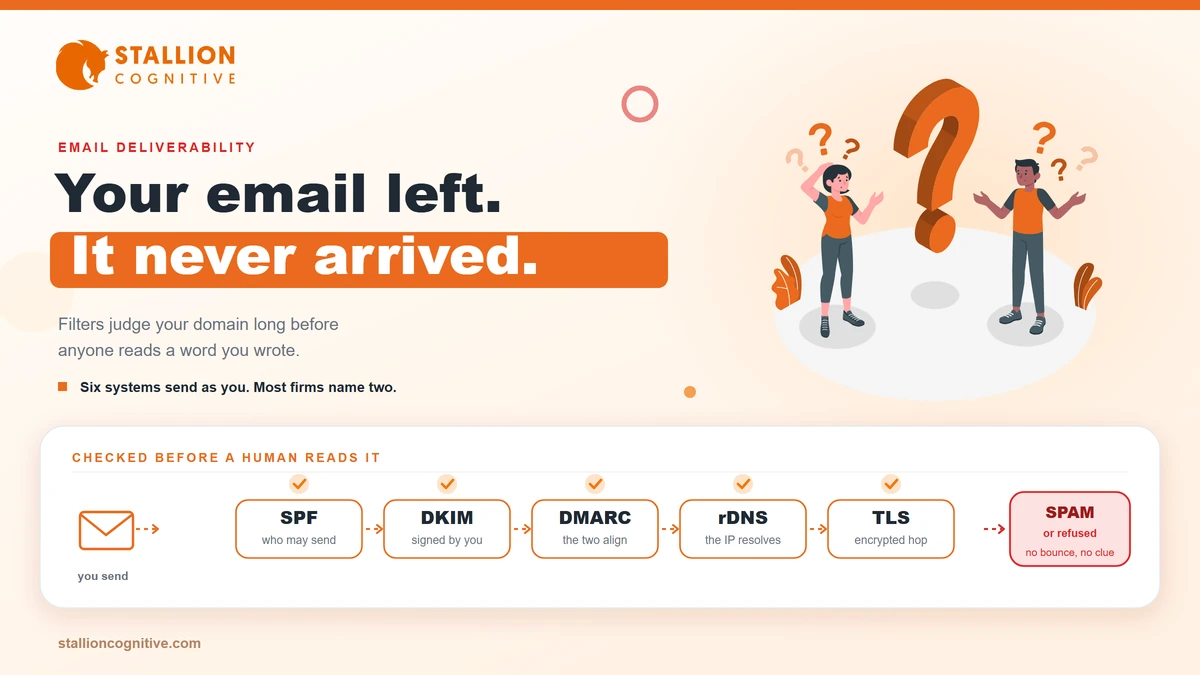
One pattern shows up again and again in the firms that come to us. A proposal goes out, the sender sees it in their Sent folder, and the client never replies. Two weeks later somebody finds it sitting in a junk folder nobody opens.
The mail never bounced. No error came back. So everyone assumed it arrived.
If your business emails are going to spam, the cause usually sits in your DNS records rather than your subject lines. Mail providers now check whether your domain has authorized the system that sent the message, and they act on what they find. This walks you through what gets checked, which rules apply at your size, and the order to fix things in.
Why are your business emails going to spam?
Because the receiving server could not confirm your domain authorized the message, or because your domain's recent sending history looks risky. Both are decided before a single word of your email is read.
That surprises people. You spent an hour on the proposal. The filter spent four milliseconds on your DNS.
Email authentication works like a guest list. Your domain publishes a record that names the servers allowed to send for you, and the receiving side checks each message against that list. Miss the list and you look like anyone else claiming to be you.
What the receiving server checks before it reads your words
The order is roughly the same at Gmail, Outlook and most business filters.
- Authentication: Do your SPF and DKIM records confirm this server is allowed to send as your domain?
- Alignment: Does the visible From domain match the one that passed?
- Infrastructure: Valid forward and reverse DNS on the sending IP, plus a TLS connection.
- Reputation: How have people treated your mail lately?
Only after all four does content get a look.
Why it can start happening suddenly
Nothing on your end has to change for delivery to fall apart. A new tool added to your stack, a host migration, or a marketing platform switched on by one department will do it.
The usual triggers, in the order we see them:
- Someone connects a new sending tool and nobody updates the SPF record.
- The site moves hosts and the DNS records do not move with it.
- A cold outreach list goes out and complaint rates spike.
- A mailbox gets compromised and sends spam for a day before anyone notices.
A site migration is the quiet one. People plan the redirects carefully and forget the mail records entirely.
What does Google actually require from your sending domain?
Two tiers of requirements, split by volume. Google's email sender guidelines set a baseline that applies to everybody who sends to Gmail, then add stricter rules once you pass 5,000 messages a day to personal Gmail accounts.
| Requirement | All senders | 5,000+ per day to personal Gmail |
|---|---|---|
| SPF or DKIM | Required (either one) | Both required |
| DMARC record | Not required | Required, p=none is acceptable |
| From-domain alignment with SPF or DKIM | Not required | Required |
| Valid forward and reverse DNS on sending IP | Required | Required |
| TLS connection for transmission | Required | Required |
| Spam rate in Postmaster Tools | Under 0.3% | Under 0.3% |
| One-click unsubscribe, RFC 8058 | Not required | Required on marketing and subscribed mail |
| RFC 5322 message formatting | Required | Required |
Read the left column again. A firm sending 30 emails a day still has to pass SPF or DKIM, still needs valid reverse DNS, and still gets measured on spam rate. The baseline is not optional for small senders.
The 0.3% figure catches people out. Three complaints in a thousand messages puts you at the line. One annoyed reader hitting "report spam" on a newsletter of 300 has already blown past it.
Do the bulk sender rules apply to a firm your size?
Probably not the high-volume tier, and definitely the baseline tier. Almost nothing written on this subject makes that split. Most of it is aimed at online stores sending huge volumes, so the advice lands wrong for a firm of twelve people.
Here is the practical read for a professional-services firm.
- Under 5,000 a day to personal inboxes: The all-sender rules bind you. SPF or DKIM, clean reverse DNS, TLS, spam rate under 0.3%.
- Sending a newsletter to a list of 6,000 in one morning: You crossed into the high-volume tier for that day, so DMARC and one-click unsubscribe apply.
Microsoft made the consequence sharper. Its requirements for high-volume senders cover anyone sending more than 5,000 messages a day to Outlook.com, Hotmail.com and Live.com addresses, and non-compliant mail is refused at the door with a 550 5.7.15 error rather than filed in junk.
Rejection is better news than it sounds. A rejected message bounces back where you can see it. A filtered message just vanishes, and you hear about it a month later from a client who thought you ignored them.
Which systems send email using your domain name?
More than you think. Most firms can name two and actually have six, and each one needs listing in your SPF record before it can send as you.
Walk your own stack against this.
| What sends the mail | Typical example | What has to authorize it |
|---|---|---|
| Your mailbox provider | Google Workspace, Microsoft 365 | SPF include, DKIM key published |
| Website contact form | WordPress plugin, PHP mail, SMTP plugin | SMTP through an authorized service |
| CRM and sales sequences | HubSpot, Pipedrive, Close | SPF include, DKIM key from the vendor |
| Marketing platform | Mailchimp, ActiveCampaign | Domain verification plus DKIM |
| Invoicing and billing | QuickBooks, Xero, a payment processor | SPF include or vendor sending domain |
| Scheduling and reminders | Calendly, a client portal | Vendor sending domain, often overlooked |
SPF has a hard limit of ten DNS lookups. Firms that keep adding tools quietly break the record, and once it breaks everything inside it stops passing at the same time.
Does your website contact form count?
It does. It also fails more often than anything else on that list.
A form that sends through the web server's built-in mail function has no authentication behind it. Nothing authorizes it. The message claims to come from your domain, arrives from your host's shared IP, and matches nothing you published. Filters treat that exactly as you would expect.
Route form notifications through an authenticated SMTP service instead. While you are in there, check that your contact page confirms submissions on screen, because a silent form plus a filtered notification means a lost enquiry with no trace at either end. Firms running multi-step forms should test the notification on every branch, since partial submissions often fire from a different template.
How do you check whether your email is authenticated?
Send one message to a Gmail address you control and read its headers. The answer takes about ninety seconds and needs no paid tool.
Read the headers on a real message
- Open the message in Gmail, click the three dots, choose "Show original".
- Look at the SPF, DKIM and DMARC lines at the top. You want PASS on all three.
- Check that the domain beside each PASS belongs to you rather than to your vendor.
Step three is the one people miss. A vendor's DKIM can pass on the vendor's domain while your domain authenticates nothing, which reads as a pass to you and a mismatch to the filter.
Check the records themselves
- Google Postmaster Tools: The only place you see your real spam rate and domain reputation as Gmail scores it.
- A DNS lookup tool: Confirms the SPF record exists, resolves, and stays inside ten lookups.
- Your DMARC reports: Aggregate XML sent to whatever address you name in the record, showing every source sending as you.
Turn DMARC on at p=none first. It changes nothing about delivery and starts the reports flowing, which is how you find the sending tool nobody told you about.
If none of this is instrumented anywhere, it usually shows up in a broader website audit alongside the tracking gaps.
What should you fix first when mail is already landing in spam?
Authentication first, always. Repairing a reputation is slow work, and it does nothing while the records still fail. Fixing the records is the only step that helps on day one.
Run it in this order.
- Inventory every sender. List every tool that sends as your domain before touching a record. Miss one and you will break it.
- Publish or repair SPF. One record, every legitimate source included, under ten lookups.
- Publish DKIM for each sender. Each vendor gives you a key to add. Do them one at a time and verify each.
- Add DMARC at p=none and point the reports at a mailbox somebody reads.
- Stop the bleeding. Pause any cold list, remove hard bounces, and leave marketing sends off for a fortnight while reputation settles.
Do not skip straight to step five. We see firms scrub their lists for weeks while an unauthenticated CRM keeps sending, which fixes nothing and wastes the fortnight.
One realistic caution. Reputation recovers slower than records get fixed. Authentication is a same-day change; a domain that has been sending complaint-heavy mail for months takes several weeks of clean sending after that before placement returns to normal.
What still filters your mail after authentication passes?
Behaviour. Once your records pass, providers judge you on how recipients react, and a technically perfect message to an uninterested list still lands in spam.
Gartner's sales research found that 73% of B2B buyers actively avoid suppliers who send irrelevant outreach. Filters are downstream of that feeling. Enough people ignore, delete or report your mail and the provider stops giving you the benefit of the doubt.
The behavioural signals that hurt most:
- Complaint rate above 0.3%, which is roughly three people in a thousand.
- Sending to addresses that no longer exist, because hard bounces read as a bought or stale list.
- Sudden volume jumps from 50 a day to 5,000 with no ramp.
- Image-only messages with almost no text, or an attachment on a first contact.
Content still counts for less than most people assume. Word choice will not rescue an unauthenticated domain, and it will not sink a well-authenticated one either.
Worth separating two problems here. Delivery failure means the message never reached the inbox. A message that arrives and gets ignored is a different issue, closer to the reasons a site produces traffic without website leads, and no DNS record will fix it.
One more thing to have in place before you need it. Mail records belong in your disaster recovery plan with everything else, because a DNS mistake at 6pm on a Friday takes your email down as thoroughly as it takes your website down.
Where this leaves you
You can test your own domain in the time it takes to read one more section of this post. Send yourself a message, open the original, and see whether all three lines say PASS on your domain.
If they do, your next question is a measurement one about whether your website is working hard enough to fill the inbox in the first place. If they do not, you now know the order to fix it in. Start with the inventory.
Would you rather find the broken record yourself, or have someone hold the whole stack together every month? Our website care plans cover DNS, mail authentication and the monitoring that catches a failure the same week it happens.
Frequently Asked Questions
How long does a damaged sending reputation take to recover?
Plan on two to six weeks of consistent, low-complaint sending after the records are fixed. Volume matters more than time. A domain sending 40 clean messages a day rebuilds slower than one sending 400, simply because providers have less evidence to work with.
Should we send marketing mail from a separate subdomain?
Splitting newsletters onto a subdomain protects your main domain's reputation if a campaign goes badly. The trade-off is that the subdomain starts with no reputation of its own and needs warming. Worth doing above a few thousand sends a month.
Is it safe to move a DMARC policy to reject?
Only after several weeks of reports show every legitimate sender passing. Move to quarantine first and watch. Jumping to reject with an unlisted sender still active will silently kill real mail from that tool.
Do free email addresses like Gmail work for business sending?
Sending client mail from a gmail.com address costs you authentication, brand recall and any DMARC protection, since you control none of the domain's records. Use your own domain through a business mailbox provider.
Does buying a dedicated IP improve inbox placement?
For most firms it makes things worse. A dedicated IP starts with zero reputation and needs steady volume to build one, so low-volume senders usually place better on a well-managed shared IP.