
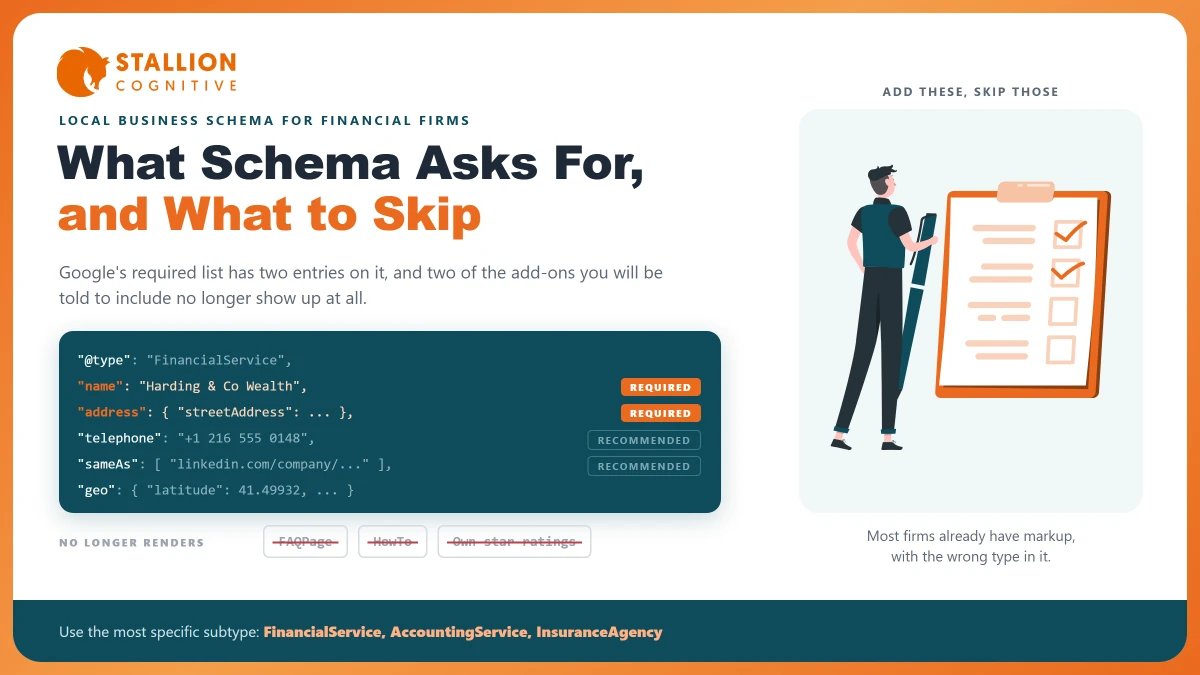
Someone has told you your site needs schema markup. Maybe an audit flagged it, maybe a developer quoted for it, maybe a rival's site has it and yours does not.
The advice you will find is oddly long. Guides on this run to three thousand words and list a dozen types of code.
Most of that length is wasted. Google's own page for this markup carries a required list with two items on it, and a suggested list you can work through in an afternoon. The more useful question is which of the things you will be told to add still does anything, because one popular tip stopped working in May 2026 and the guides have not caught up.
What Is the Code, and What Does Google Require?
Schema markup is a block of code, usually written in a format called JSON-LD, that states plainly what a page is about. A reader sees a firm in Cleveland. The code says the same thing in a form no machine can misread.
Google's local business page lists what it needs, and the list has two items on it:
- The firm's name: The exact name you trade under.
- The firm's address: A full postal address block, with street, town and postcode in separate fields.
Everything else on that page sits under Recommended. That covers hours, map points, phone, price range and the web address. Recommended means Google finds the field useful, and it still does not mean you have to supply it. A page carrying a name and an address is valid.
That gap saves money. Firms get quoted for schema work priced as though the required list ran to forty items.
One warning on that page is worth reading before you start. Google says that "if your site violates one or more of these guidelines, then Google may issue a manual action against it." Code describing a business you do not run, or hours you do not keep, is a risk and not merely a gap.
Which Subtype Should Your Firm Use?
Google's own instruction is to "use the most specific LocalBusiness sub-type possible." Its examples are restaurants and day spas, and it names no financial types at all. So this step gets skipped or guessed.
The types do exist. Schema.org puts a financial services type directly under local business, with four narrower types beneath it. The exact value you type into your plugin sits in the middle column:
| Your firm | Value to enter | Notes |
|---|---|---|
| Financial adviser, wealth manager, planner | FinancialService | The general case, and the right default |
| Accountant, CPA, bookkeeper, tax practice | AccountingService | A narrower type under financial services |
| Insurance broker or agency | InsuranceAgency | A narrower type under financial services |
| Bank or credit union | BankOrCreditUnion | A narrower type under financial services |
| Law firm | LegalService | A sibling of financial services under local business |
| Mixed practice, no clean fit | LocalBusiness | Right and broad beats narrow and wrong |
The financial services type adds one field its parent does not have, a note on fees and commissions, which schema.org describes as a "description of fees, commissions, and other terms applied either to a class of financial product, or by a financial service organization." If you already publish your prices, that field is where the machine-readable version of them goes.
Picking the broad type when you are unsure is perfectly safe, and the only version of this that can hurt you is claiming to be a bank when you are an advice firm.
What Does Google Still Show?
Every other page on this topic starts to look dated right here.
A block of code either earns you a visible search feature or it earns you nothing a searcher will notice. Google has spent three years withdrawing features, so the list that still changes the results page is shorter than it was:
| Schema type | Status in 2026 | Worth adding |
|---|---|---|
| Local business and its subtypes | Feeds how Google reads the firm, and can support a knowledge panel | Yes |
| Organisation | Name, logo and official profiles | Yes |
| Breadcrumbs | Still shows in results | Yes |
| Article | Supports article styling on blog posts | Yes |
| FAQ | Pulled from Search, announced May 2026 | No |
| How-to | Dropped as a rich result | No |
| Star ratings about your own firm | Ineligible under Google's rule | No |
The FAQ line is the one worth a moment. Google cut that rich result back to "well-known, authoritative government and health websites" in August 2023, then pulled it from Search for good, with the FAQ page carrying the notice. Guides written this year still tell firms to add FAQ code for common branch questions.
Old FAQ code already on your site is harmless and does not need stripping out, since unused markup simply sits there doing nothing at all. What it will never do is the thing someone promised you it would.
What the code still does is name you. It tells Google that the firm described on this page is the same firm as the profile, the listing and the mentions scattered elsewhere, which is the job NAP consistency does in words.
The Properties Worth Adding
Working down Google's suggested list, ranked by what a professional firm gets from each:
- Phone and web address: Cheap to supply and hard to misread. Google says the web address helps it "uniquely identify your organization."
- Map point: Latitude and longitude, where Google asks for at least five decimal places. People fill this in casually and get it wrong.
- Opening hours: Worth adding only if your posted hours are accurate, because wrong hours in code are worse than no hours.
- Profile links: Your checked profiles elsewhere, which Google describes as pages "on another website with additional information about your organization." For most firms this is the most valuable optional field on the list.
- Price range: Capped by Google at under 100 characters, and safe to skip when the honest answer is that it depends.
- Departments: Only for firms with clearly separate practice units at one address.
A separate block sits outside all of this. The organisation block, which Google says has no required fields at all, belongs on your home page or on the single page describing the firm. Google adds that you do not need it on every page. Its logo field decides which logo appears beside your name.
If you have more than one office
Each location page carries its own block, with that office's address, phone and hours, linked back to the parent firm. One shared block covering three offices tells Google there is one office. The mess almost always comes from one of these:
- Never copy a block between location pages without changing every field in it.
- Check each page on its own, because the map pack is decided per location.
The Code to Leave Out
Some tempting extras do nothing at all, and a couple actively cause harm.
Star ratings for your own firm: Google's review snippet page states that where "the entity that's being reviewed controls the reviews about itself," pages using local business or any organisation type "are ineligible for star review feature." This is the schema job most often sold to professional firms, and it cannot work.
FAQ code on service pages: The search feature it was meant to produce no longer exists, as the table above sets out, so new FAQ markup buys you nothing at all.
Code describing things that are not on the page: Markup is meant to describe what a reader can see, so services you do not list, hours you do not post and an address you do not sit in all belong to the group that draws the manual action Google's rules mention. It is usually the work of a plugin nobody configured rather than a deliberate attempt to cheat.
A habit belongs on that list too. Schema gets sold as a ranking lever when what it really does is help a machine read the page, and a page that does not deserve to rank will not start ranking because it is now read more precisely.
Adding It in WordPress Without Touching Code
You almost certainly do not need a developer here.
- Check what you already have: Most SEO plugins publish organisation or local business code by default, set up badly. Fixing what is there beats adding a second block that argues with it.
- Set the type once: In the plugin's schema settings, choose organisation instead of person, then enter the exact value from the table above if the field accepts one.
- Fill the fields the plugin gives you: Name, address, phone, web address, logo, and the profile links.
- Do not add a second schema plugin: Two plugins publishing blocks about one firm make two competing claims about one thing, which is worse than having neither.
- Watch for code written by a script: If the block is added by JavaScript instead of served in the page, it can go unread, which is the same class of problem covered in JavaScript SEO work.
The most common finding on these audits is not missing code at all, but two plugins describing one firm in two different ways.
Checking That It Worked
Paste the page address into Google's Rich Results Test and read what it found. It reports the type it saw and any errors in the block.
Then check what the tool cannot see:
- Does the type match the firm? A tool reporting a valid local business block on an accounting practice is reporting valid code and a missed subtype at the same time.
- Does the address match your profile exactly? Code that argues with your listing is the very problem it was meant to fix. Worth doing while you verify your Google Business Profile.
- Is Search Console reporting enhancements? Errors show up there over the following weeks, on real crawls instead of one test.
If you are running this inside a wider pass, the schema step sits within a local SEO audit and beside the rest of an on-page SEO checklist.
Where to Start
Open your home page in the Rich Results Test before you buy anything. Most firms find code already there, published by a plugin, with the wrong type and half the fields blank.
Then work through this list, in order:
- Fix the type to the subtype that matches your firm.
- Fill the address so it matches your profile character for character.
- Add your profile links so Google can tie the firm together.
- Skip FAQ code, which is the line item that no longer buys you anything.
That is most of the value on offer, and none of it needs a quote. If a proposal on your desk prices schema as a project, the question worth asking is which search feature each line is meant to produce, because two of the usual items now produce nothing at all.
We build and look after websites for financial and professional firms, and we set schema against what Google shows today instead of against a template. If you want your current code read properly, talk to our team.
Frequently Asked Questions
Will this code make us rank higher?
Not on its own. It helps Google name the business and tie it to profiles elsewhere, which supports local visibility. Rank still turns on relevance, distance and the rest of the local signal set.
How do we handle a firm with three branches?
Give each branch page its own block with that branch's address, phone and hours, all pointing back to the parent firm. A single shared block tells Google you have one site.
Do we need JSON-LD, or is microdata fine?
Both get read. JSON-LD is the practical pick because it sits in one place and survives a redesign, while microdata is woven through the page and breaks when a template is edited.
What happens if our old FAQ code stays on the page?
Nothing at all. Unused schema has no bad effect on Search. It simply shows nothing, which is why it is not worth adding to new pages.
Should the address include a suite number?
Use exactly the address on your checked profile, suite number included if it appears there. Matching the two is the whole point of the field.