
Your website looks fine to you. It loads on your office wifi, the design is clean, and nothing looks broken. So why are the leads thin? Often the answer is a slow website losing you customers before they even see your offer, because the page took too long and they left.
Speed is the one problem you rarely notice yourself. You have fast internet and a cached site. Your visitor on a phone, on mobile data, in a hurry, has a completely different experience.
We audit sites for a living, and slow load times show up again and again behind quiet, unexplained lead loss. Below is how to tell if that is you, and what to do about it.
Is Your Slow Website Actually Costing You Leads?
Yes, almost certainly, if your pages take more than a few seconds to load on a phone. A slow site pushes people away before they read a word, and the ones who leave rarely come back to try again. The lost lead never shows up as a complaint.
The frustrating part is that slow-site damage is invisible from the inside. You see the sale you closed. You never see the ten people who bounced on the loading spinner.
Watch for these patterns.
- Good rankings, thin traffic: You sit on page one for your terms, yet clicks and visits stay low.
- High bounce on mobile: Your phone visitors leave far faster than desktop, and few reach a second page.
- Ad spend that leaks: Paid clicks arrive, then abandon before the page finishes, so you pay for a visit that never lands.
- Form starts that never finish: People begin an enquiry, the page stutters, and they give up mid-way.
Any one of these on its own is easy to explain away. Together, they point at load time. And load time is measurable, so you can stop guessing and start checking.
What Slowness Really Costs You
Speed maps directly to money, and Google has the data to prove it. When pages get faster, more visitors convert. When they drag, more leave before they act. The effect is largest on mobile, where most of your first-time visitors now arrive.
Google and Deloitte studied this across hundreds of sites in a report called Milliseconds Make Millions. A speed improvement of just one tenth of a second lifted retail conversions by 8.4% and travel conversions by 10.1%. That is faster than a blink, and it moved real revenue.
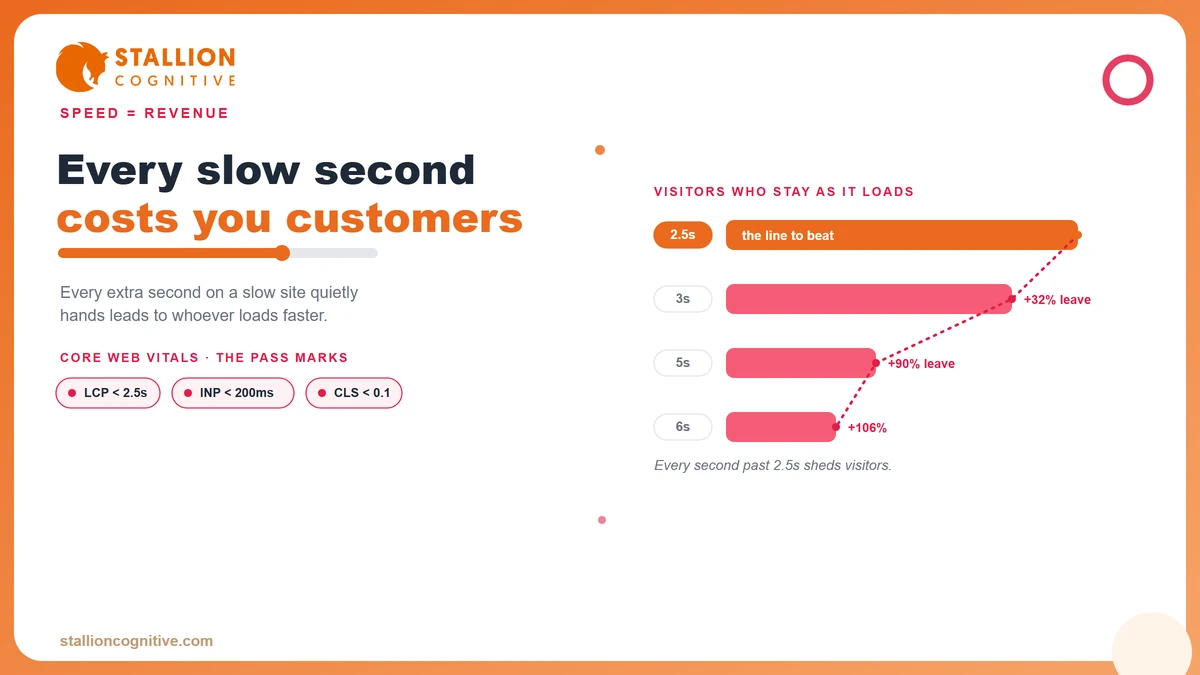
The reverse is brutal. Google's mobile benchmarks show that as load time climbs from one second to three, the chance a visitor bounces rises 32%. Stretch it to five seconds and that probability climbs 90%.
Every extra second is a share of your visitors deciding they would rather be somewhere else.
The pattern is easy to read as a table.
| Load time | Bounce probability vs 1 second |
|---|---|
| 1 to 3 seconds | Up 32% |
| 1 to 5 seconds | Up 90% |
| 1 to 6 seconds | Up 106% |
Now put a number on it for your own business. If you spend on ads or rank well, a slow page is charging you a tax on every visit. The traffic is already there. Even a high-converting website cannot convert a visitor who never sees it.
How Fast Should a Business Website Load Now?
Aim for your main content to appear in under 2.5 seconds, for the page to respond to a tap in under 200 milliseconds, and for the layout to stay still as it loads. Those three numbers are Google's Core Web Vitals thresholds, and they are the closest thing to an official pass mark for site speed.
Google groups the reader's real experience into three Core Web Vitals metrics. Each measures a different kind of frustration.
- Largest Contentful Paint (LCP): how long until the biggest thing on screen loads. Good is under 2.5 seconds.
- Interaction to Next Paint (INP): how quickly the page reacts when someone taps or clicks. Good is under 200 milliseconds.
- Cumulative Layout Shift (CLS): how much the page jumps around while loading. Good is under 0.1.
These thresholds come from Google's own guidance, and they sit at the point where most users start to feel friction.
Do not guess where you land. You can test your website speed against these exact numbers in a couple of minutes, and the result uses the same data Google sees. Fail even one of the three and some share of your visitors is feeling it.
INP Is the New Bar Most Sites Are Failing
In March 2024, Google swapped an old speed metric for a tougher one. Interaction to Next Paint, or INP, replaced First Input Delay, and it judges your site far more harshly. It measures how fast your page responds to every tap and click across a whole visit.
The old metric only looked at the very first interaction. A site could feel snappy on the first tap and sluggish on every one after, and still pass. INP closed that gap.
Google confirmed the switch on March 12, 2024. Plenty of sites that scored green the week before woke up in the red, without changing a single line of code. The rules simply got stricter.
Your site can slip on a metric your last developer never had to think about.
Why should a business owner care about a metric name? Because it now shapes how Google reads page experience, and because it tracks the exact laggy feeling that makes a visitor abandon a form. A checkout or enquiry flow that stutters on the third tap is precisely what INP catches.
Two things make sites fail INP most often.
- Heavy scripts: Tracking tags, chat widgets, and page builders pile on code that blocks the page from responding.
- Bloated pages: The more a browser has to process, the longer each tap waits its turn.
If your site was built a few years ago and nobody has touched its performance since, assume you are failing this one until a test proves otherwise.
Why Finance and High-Ticket Sites Pay the Steepest Price
A slow site hurts every business, though it costs a financial advisor or a high-value service firm more than it costs a corner shop. The reason is trust. When someone is about to hand you their money or a major decision, a sluggish, stuttering website reads as a warning sign long before they can explain why.
High-ticket buyers behave differently, and speed plays into all of it.
- Trust is the product: A slow, janky site quietly signals that the details are not looked after, which is the opposite of what a finance buyer wants to feel.
- The research is long: These buyers visit many times across weeks, so friction compounds over every session.
- Mobile is where they start: Most first visits happen on a phone during a spare moment, and that is exactly where slow sites fail hardest.
When someone is comparing three advisors on their phone during a lunch break, and your page takes six seconds to show them anything, they do not sit there wondering what is wrong, they simply tap back and open the competitor who loaded while yours was still thinking. Google also reads the mobile-first version of your site before the desktop one, so a slow phone experience drags your rankings too.
We see this most clearly with advisors and planners. A financial planner's conversion rate often hinges on a handful of high-intent visitors a month, so losing even two to a slow load is a real dent in the pipeline.
Ask yourself what a single new client is worth over their lifetime with you. For most high-ticket firms, one lost lead a month dwarfs the entire cost of fixing the site.
How to Tell If Your Site Is the Problem
Spend ten minutes and you will know. Run your site through a free speed tool, check it on your own phone off wifi, and watch what your analytics already tells you about mobile visitors. The signs are consistent once you know where to look.
Work through these checks in order.
- Run a speed test. Put your homepage and your main service page through a free tool like Google PageSpeed Insights, and note the Core Web Vitals result for mobile rather than desktop.
- Use your own phone. Turn off wifi, load your site on mobile data, and count the seconds until you can actually read and tap. That is your customer's real experience.
- Read your analytics. Compare mobile bounce rate and pages per session against desktop. A big gap points straight at load time or layout.
- Check field data. Tools built on the Chrome User Experience Report show how real visitors experienced your site, which beats a single lab test.
One caution before you relax. A speed tool grades a single page, so test a few of your most important ones. A fast homepage hiding three slow service pages still loses you the leads that matter.
What Actually Makes a Site Slow, and What a Fix Looks Like
Most slow business sites share the same few culprits, and none of them require you to become technical. Oversized images, a bloated theme, cheap hosting, and too many plugins cause the majority of what we find in audits. The fix ranges from an afternoon of cleanup to a full rebuild, depending on how deep the problem goes.
The usual culprits break down like this.
| Common cause | What it does | Typical fix |
|---|---|---|
| Huge images | Full-size photos load on phones | Compress and resize, minutes per page |
| Bloated theme or builder | Ships heavy code you never use | Switch theme or rebuild lean |
| Cheap shared hosting | Slow server response before anything loads | Move to faster hosting |
| Plugin overload | Each add-on adds scripts and requests | Audit and remove the dead weight |
| Too many redirects | Extra hops delay the page | Clean up with proper 301 redirects |
| Render-blocking scripts | Code loads before content can show | Defer non-essential scripts |
The good news in that table is how much is quick. Compressing images and trimming plugins can shave seconds off a page in a single afternoon.
The harder cases are structural. When a site is built on a heavy, aging theme, or it renders content in a way that slows crawling and loading, patching around it rarely holds. That is when a rebuild on a lean, modern foundation pays for itself, because you fix the cause instead of the symptom.
Either way, speed is fixable. The real question is whether your current site is worth speeding up or ready to be replaced, and an audit answers that fast.
Is Your Website Fast Enough to Win the Lead?
You now know the bar, the cost of missing it, and how to check where your own site stands. Speed is rarely the reason a business thinks it is losing leads, and it is often the reason it actually is.
The sites that win treat load time as a business number instead of a technical footnote. A page that loads fast on a phone earns the click, holds the visitor, and gives your offer a chance to do its job. A slow one quietly hands that visitor to whoever loads next.
If your own test came back red, or you are not sure your website is still pulling its weight, that is worth a proper look. Our web design and development work rebuilds slow, dated sites into fast ones that turn visits into enquiries, with speed built in from the first line of code.
So what did your speed test say? Book a call and we will find every second your site is losing and map the fastest way to win it back.
Does website speed affect my Google rankings?
Speed is part of Google's page experience signals, so a very slow site can lose ground, especially against a faster competitor chasing the same terms. Content and links still count for more, though when two pages are close, the faster one tends to win the position.
How much does it cost to speed up a website?
Simple wins like image compression and plugin cleanup can cost very little, sometimes just a few hours of work. Deeper problems, a heavy theme or poor hosting, may need a rebuild. An audit prices it accurately by finding what is actually slowing you down.
Is it my hosting or my website that is slow?
Both are common causes, and a speed test helps separate them. A high server response time points at hosting, while slow loading after the server responds points at heavy images, code, or scripts sitting on the page itself.
Can my traffic recover after I fix the speed?
Faster pages usually regain lost ground over a few weeks, as Google recrawls and as visitors stop bouncing. Recovery comes quicker when speed was the main issue rather than one problem among several, so fix it cleanly and measure the result.
Will a faster website lower my Google Ads costs?
Google factors landing page experience into Ad Rank and Quality Score, so a faster page can lower your cost per click and stretch the same budget further. The paid traffic you already buy also converts better when it does not abandon on a slow load.